
What You’ll Learn
Automation bypass rational behavior is the practical decision to ignore, override, or work around CRM automation when the official workflow is slower, less reliable, too rigid, or less transparent than a manual alternative.
It happens when automation adds friction, hides errors, uses stale data, mishandles exceptions, removes context, or gives users no way to see or correct what happens after a trigger fires.
Teams may use spreadsheets, inboxes, side notes, or shadow tools not because they reject process, but because they are protecting speed, control, and outcomes.
Repeated automation bypass is a diagnostic signal that the system design no longer matches real work.
Key Takeaways
- Automation bypass rational behavior arises when friction, data decay, or rigid system logic slow teams down.
- Manual workarounds and shadow tools often indicate deeper system brittleness rather than cultural resistance.
- Hidden automation failures can silently undermine business results while remaining invisible to dashboards.
- Recurrent manual intervention signals a need to diagnose underlying friction and misalignment, not blame users.
Most executives assume automation guarantees efficiency, but on the ground, the opposite often happens: teams bypass “smart” workflows and opt for manual routes that actually move deals faster.
This isn’t resistance to change or sloppy process – it’s the most rational choice when the system gets in the way.
If your CRM automation is ignored, that’s not a cultural problem.
It’s a survival skill in action.
That broader pattern is outlined in Marketing Automation & CRM.

Why bypassing CRM automation often feels like the right move
Speed is oxygen for revenue teams.
But imagine being forced to use a new CRM workflow that takes three screens and twelve clicks – when last quarter’s spreadsheet achieved the same in one shot.
We’ve seen sales leads abandon automated lead assignment because it slowed response time, costing them deals.
The myth is that every automated step is a time-saver.
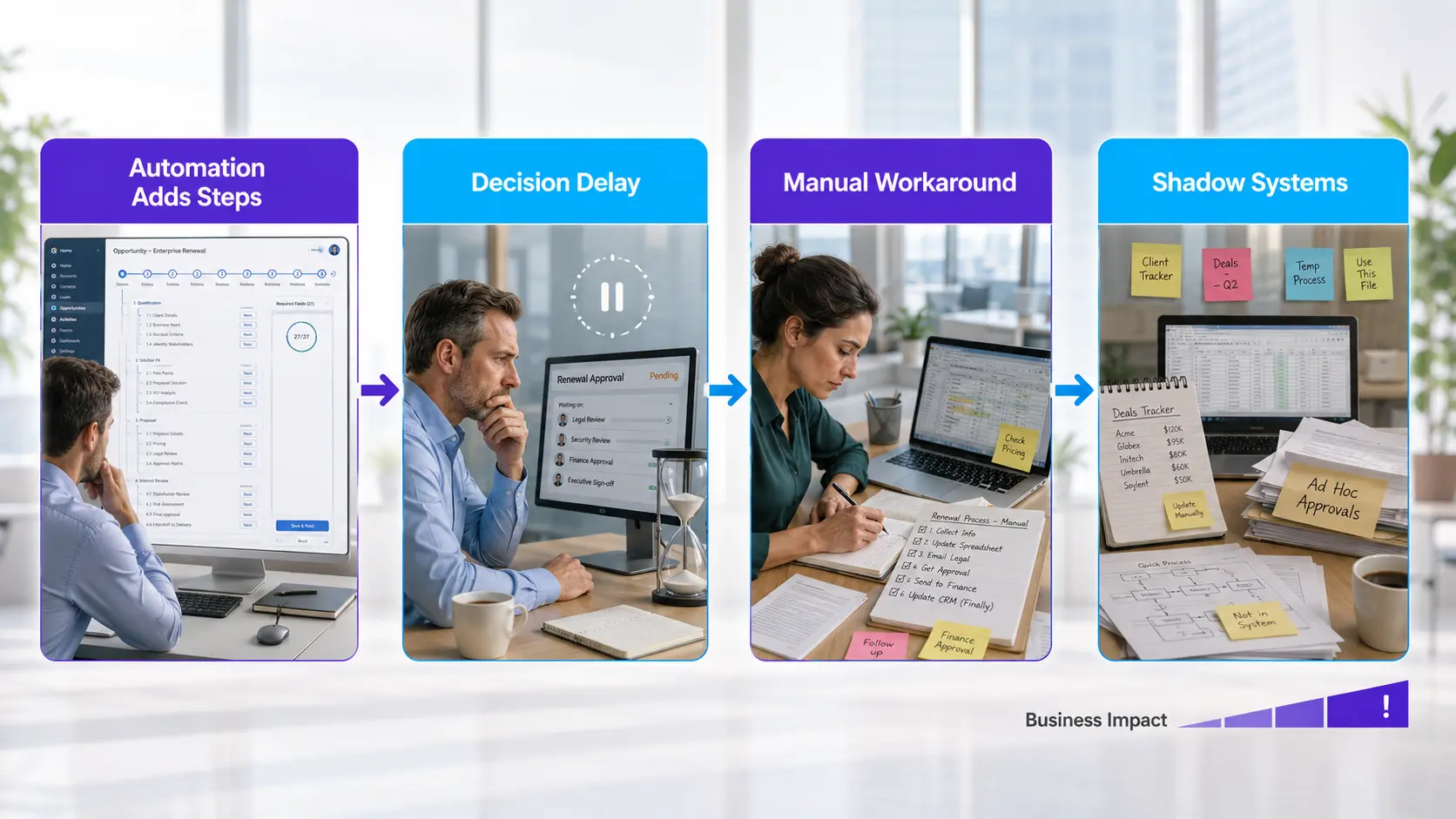
In reality, brittle automations add steps, force rigid behaviors, or break unpredictably with edge cases – turning “frictionless” into frustrating.
One head of sales described it simply: “If I have to double-check every automation, I’d rather do the task myself”.
When automation adds friction instead of removing it
Think of it like a self-checkout kiosk that jams if you scan items too fast.
Eventually, the line forms at the human cashier, not because people hate technology, but because it works reliably and adapts in real-time.
Automation friction isn’t a user error – it’s a rational response to a system that prioritizes process over outcome.
Common Automation Friction Points vs. Manual Workarounds
| Indicator | Description | Why It Prompts Manual Workarounds |
| Friction and Delays | Small lags and slow automated workflows frustrate users | Manual tracking is faster to meet urgency |
| Rigid Logic | Process rules don’t flex to handle exceptions or nuance | Users override or bypass to handle unique situations |
| Brittle Integrations | Broken or changed integration fields cause failures | Users track manually to avoid losing data |
| Silent Failures | Partial automation failures that show as successful in dashboards | Manual follow-ups catch what automation misses |
When data decay makes automation unreliable
Automation’s value collapses when its fuel – data – goes bad.
If your contact records are out of date, triggers misfire.
When deal stages don’t reflect reality, forecasts are fantasy.
For one SaaS client, automated nurture emails kept targeting the wrong accounts after a territory shift.
Their team stopped trusting “set and forget”, and started working leads off of personal notes instead.
That’s not sabotage.
That’s risk management.
Signs Data Decay is Undermining Automation
- Contact records are outdated, causing triggers to misfire
- Deal stages no longer reflect the true sales process
- Automated nurture emails target incorrect accounts
- Teams lose trust in ‘set and forget’ automated workflows
- Users feel unable to fix errors due to lack of visibility
When you can’t see into automation logic or fix stale data directly, confidence erodes fast.
Users feel like passengers in a car with no dashboard.
Two questions drive manual fallback: “Is this data right?” and “Can I fix it if it’s not?” The workaround isn’t a sign of noncompliance – it’s a symptom of automation silent failure.
When automation bypass rational behavior dominates, look for underlying frictions or data decay before blaming your team.
Bypassing CRM automation is rarely irrational or lazy.
It’s the byproduct of systems that don’t keep up with the pace or reality of business.
When teams revert to manual, it’s the clearest possible signal that something fundamental needs a rethink.

How hidden failures let broken systems keep running without triggering alarms
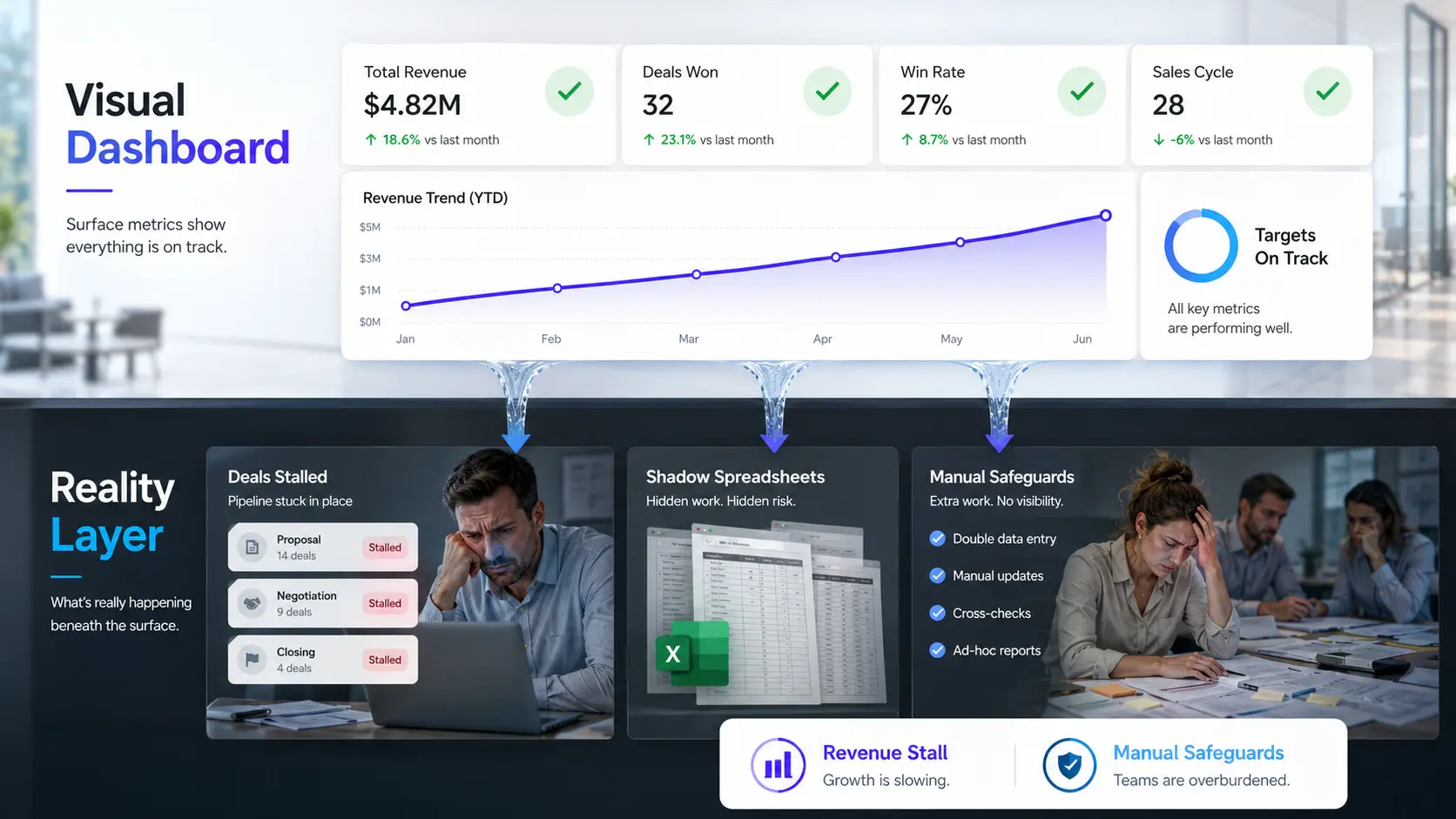
Most automation breakdowns don’t show up as red error banners – they masquerade as success in dashboards, silently eroding trust beneath the surface.
You can have a CRM pipeline where every status updates on schedule, but deals stall because the actual buyer activity never fed through.
That’s the trick: on paper, the system performs; in reality, results stall and users quietly switch to their own tools.
Automation that succeeds on paper but fails in outcomes
Here’s the secret: systems rarely announce their own irrelevance.
You see workflows execute, triggers fire, and the audit trail fill up with green checks – but revenue doesn’t move.
Teams will flag issues if they see visible crashes, but partial failures, especially downstream (like a nurture email sent from outdated data or a deal stage advancing off a stale trigger), leave no immediate smoke.
We’ve seen teams maintain diligent CRM hygiene, only to discover a silent backlog of leads routed to nowhere because an integration field changed name.
The myth is that automation reduces manual error.
In practice, brittle systems only change the error type: from visible human slip-ups to invisible, process-based drift.
It’s like relying on an autopilot that keeps flying, even after navigation data goes stale – the journey continues, but to the wrong destination.
How many times have you asked why a ‘closed-won’ deal quietly disappears, or why marketing swears leads get routed but the sales team never sees them?
Until manual follow-up intervenes, these failures sit undetected, sabotaging outcomes behind the scenes.
Why missing visibility turns automation into background noise
Once users sense outputs are unreliable – and the system hides what happens after a click – automated processes become background noise.
People ignore the green checkmarks and start building shadow systems: spreadsheets, inbox folders, shared docs.
These stopgap measures aren’t defiance; they’re rational risk management when system opacity breeds CRM data distrust.
In one client’s case, the sales team quietly tracked all high-value accounts in their own spreadsheet, side-stepping the CRM’s clunky hand-off workflow.
Why?
Because corrections vanished with no trace, and no one could see what happened after the submit button.
Out of sight, out of mind: automation silent failure lets broken paths persist without alarms.
If visibility is missing, even the best-intentioned team will layer manual controls to protect outcomes.
The analogy?
It’s like a building with a fire alarm that doesn’t ring: everyone eventually carries their own smoke detector, just to feel safe.
Silent automation failure isn’t rare; it’s structural.
And as we’ll see, these invisible gaps are the blueprint of shadow systems that signal much bigger risks, not just end-user frustration.

Understanding why workarounds become the path of least resistance
Most believe automation keeps teams in sync – yet often, the opposite happens: the quickest path is straight through the side door.
In every organization we’ve seen, the pressure for real-time answers or urgent decisions exposes a hard truth – users don’t bypass automation because they’re stubborn, but because the system design leaves them with no better option.
Why do rational people keep returning to spreadsheets, inboxes, or back-channel calls, even when automation promises to handle everything in one place?
When ownership and context aren’t embedded in system logic
Put simply: when a system can’t make sense of nuanced situations, people step in.
A CRM that misses territory updates or can’t flag that a key client is mid-renewal causes instant mistrust.
Users don’t just want automation – they want automation that actually thinks like them, or at least knows when to hand back the controls.
The myth: that process rules can replace judgment.
With one client, we watched sales managers hit a “deal on hold” button designed to escalate exceptions – but the automation routed these straight to generic queues, stripped of background.
Almost every time, managers ended up emailing side notes (“ignore what the CRM says, this account needs special handling”).
They weren’t resisting automation.
They were correcting its lack of context.
If your team keeps overriding logic, it’s not rebellion – it’s triage.
It’s like a GPS that can’t detect a road closure: you take the detour because it’s faster than waiting for the map to update.
Systems that ignore local reality force people to invent their own lanes.
When shadow tools outperform the system by preserving control
No one sets out to build a shadow process, but once a spreadsheet gives teams faster, safer control, it’s hard to put the genie back.
Spreadsheets and inboxes flourish wherever core automation can’t flex to exceptions, serve up the right context, or give clear “why” behind automated moves.
It only takes two botched automations before a high-performer thinks, “If I run it in Excel, at least I’ll see every number”.
Reasons Teams Create Shadow Tools Instead of Using Automation
- Core automation cannot flex to exceptions or nuanced scenarios
- Automated processes lack sufficient context for decisions
- Teams want transparency to understand ‘why’ behind moves
- Manual tools provide faster, safer control over data
- Shadow tools act as trusted fallbacks when automation is rigid or opaque
With a fintech client, users built daily snapshot reports that mirrored the official dashboard, but with manual tweaks for nuances like client risk level or fee structures.
This wasn’t inefficiency – it was making the system trustworthy by adding eyes and hands where automation was rigid or opaque.
The repeat behavior sent a clear message: teams will always find paths that let them see – and steer – the details that matter.
The analogy here?
Think of shadow tools as emergency exits in a locked building – designed by users, not architects, and used whenever the main doors jam.
What’s often called “user resistance” is actually rational risk management.
When automation bypass rational behavior emerges, it’s usually a signal that the official path is slower, less flexible, or less transparent than the workaround.
Manual workarounds aren’t a productivity crime – they are the fastest available alignment between team intent and system reality.
Ignore the urge to blame users.
Instead, pay attention: these patterns reveal exactly where the system falls short and what true alignment will require next.

When bypass patterns signal deeper structural risks, not cultural failure
Most leaders misread workarounds as laziness or insubordination.
The reality is sharper: manual bypasses are like smoke alarms – the first clear sign something in your automation stack is already broken.
When teams consistently step outside the official system, you’re not witnessing resistance; you’re getting an early warning that the process can’t withstand real-world pressure.
Workarounds as early warning of systemic brittleness
If workarounds spread quietly, it’s usually because the system can’t meet the actual pace or context of the work.
We’ve seen high-performing sales teams copy entire deal pipelines into spreadsheets, not because of habit, but because their CRM automation creates friction – small lags, rigid logic, or brittle integrations.
Over time, these minor annoyances pile up, turning “just this once” manual fixes into shadow systems that carry real risk.
Systemic Brittleness Indicators Seen in CRM Workarounds
| Friction Point | Description | Impact on Users |
| Multiple Screens & Clicks | Automated workflow requiring navigating several screens and many clicks | Slows down response time; frustrates users |
| Brittle Automations | Automation fails or breaks in edge cases or unpredictable scenarios | Users must double-check or fix manually |
| Rigid Behavior Enforcement | Forced process that doesn’t adapt to real-time changes or context | Inflexibility causes delays and errors |
| Invisible Failures | Automation appears successful but fails silently behind the scenes | Trust in system erodes; outcomes stall |
Here’s the myth: automation silent failure means the main system still works most of the time.
In reality, each workaround is a pressure release valve – evidence of unacknowledged brittleness.
Ignore the pattern and your dashboard will look healthy while the underlying process quietly fragments.
Manual fallback rationality isn’t dysfunction; it’s the rational response when automation can’t flex with the edge cases and real speed teams need.
Why do users invest time in parallel tracking or ad-hoc reporting?
Because those manual efforts flag that the official workflow can’t absorb complexity without breaking.
It’s like using a catch basin under a leaky pipe: the real problem isn’t the bucket, it’s the water nobody wants to talk about.
What this reveals about trade-offs between speed and consistency
Here’s where the real tension shows up: every manual workaround is a vote for speed over uniformity.
In the field, the pressure to close deals or resolve customer issues beats out perfect process every time.
One client, facing rigid CRM workflows, saw their top reps submit critical updates over chat and phone, not because they were shortcutting – they were avoiding delays that automation built in the name of consistency.
Can you really blame people for picking certainty and speed when slow automation threatens revenue?
If CRM data distrust is spreading, or shadow systems multiply, it’s not about culture gaps – it’s about automation friction forcing trade-offs no dashboard will show.
The analogy here: your system’s guardrails work until the road curves unexpectedly.
If every driver takes the shoulder instead, that’s diagnostic, not defiant.
It reveals which friction points are urgent to fix instead of policing the route. Manual workarounds aren’t a sign that people refuse to adapt – they’re the first signal that your design assumptions no longer match reality.
Treating bypass patterns as diagnostic feedback helps teams see where automation has become too rigid, too opaque, or too slow for real work.
But bypass behavior is only one part of the problem.
The next risk appears when automation keeps producing activity, alerts, handoffs, and dashboard movement – while business outcomes still fail to improve.
That is where automation stops being a workflow issue and becomes a signal-quality problem.

Scientific context and sources
The sources below provide foundational context for how decision-making, attention, and performance dynamics evolve under scaling and constraint conditions.
- Cognitive limits in automation
The Out-of-the-Loop Performance Problem and Level of Control in Automation – Mica R. Endsley, Esin O. Kiris – Human Factors: The Journal of the Human Factors and Ergonomics Society
Explains how automation can degrade performance by disconnecting users from system context, reducing situation awareness, and making manual recovery harder when automation fails.
https://journals.sagepub.com/doi/10.1518/001872095779064555 - Data quality and trust in automated systems
Beyond Accuracy: What Data Quality Means to Data Consumers – Richard Y. Wang, Diane M. Strong – Journal of Management Information Systems
Explores how data quality depends on fitness for use, context, representation, accessibility, believability, and relevance – directly supporting the article’s point that decaying data integrity erodes trust in automated workflows.
https://www.jmis-web.org/articles/1002 - The paradox of automation and organizational adaptation
Between Craft and Science: Technical Work in the United States – Stephen R. Barley, Julian E. Orr – Cornell University Press / ILR Press
Documents how technical work depends on situated judgment, practical knowledge, and local adaptation, supporting the article’s argument that rigid systems often force workers to create parallel manual practices.
https://www.jstor.org/stable/10.7591/j.ctv75d65m - Behavioral adaptation to IT constraints
Exploring the Shadows: IT Governance Approaches to User-Driven Innovation – Andreas Györy, Anne Cleven, Falk Uebernickel, Walter Brenner – ECIS 2012 Proceedings / AIS Electronic Library
Details how shadow IT can emerge when official IT cannot meet business needs, making it a rational response to inflexible systems and process bottlenecks.
https://aisel.aisnet.org/ecis2012/222/
Questions You Might Ponder
Why do employees often bypass CRM automation in high-pressure situations?
Many employees bypass CRM automations when under time pressure because manual processes allow faster adaptation and real-time adjustments, especially when automation adds friction or fails to handle exceptions well. This demonstrates automation bypass rational behavior as a survival mechanism rather than simple resistance.
How does poor data quality impact automation trust and outcomes?
Automation reliant on outdated or inaccurate data can misfire, leading to errors such as missed leads or incorrect routing. As automated outcomes become unreliable, users lose trust and revert to manual workarounds to regain control and maintain business results.
What are shadow systems and why do they emerge in automated workflows?
Shadow systems, like personal spreadsheets and email threads, emerge when official automation cannot flex to business nuances or provide transparency. They represent rational responses to inefficiencies, offering teams greater control and immediate visibility when standard CRM processes break down.
How do hidden automation failures silently disrupt business performance?
Hidden failures, such as ineffective CRM automations that appear to function but produce no real business impact, often remain undetected in dashboards. Users compensate by using manual methods, allowing broken processes to persist without triggering alarms or visible errors, quietly hindering performance.
What does persistent use of manual workarounds indicate about CRM system health?
Regular manual bypasses signal deeper systemic brittleness or misalignment between automation design and business needs. Rather than a sign of poor culture, these workarounds act as early diagnostic indicators that CRM workflows require urgent optimization to prevent fragmentation and risk.