What You’ll Learn
trust reset
Key Takeaways
- Trust resets occur when redesigns remove recognition cues, causing users to hesitate and conversions to stall.
- Returning users are most affected, showing sharp dips in conversion and loyalty when navigation or key visual elements change.
- Visual updates alone cannot fix systemic navigation or trust failures—intent clarity and recognition stability are essential.
- Regular diagnostics of user behavior and friction points are necessary to identify and resolve trust resets after redesigns.
Why do conversion rates sometimes drop after a “beautiful” redesign – even when usability seems untouched?
This is the redesign trust reset: users can feel unsafe in less than two seconds when familiar cues disappear.
The brain treats trusted logos, button positions, and color anchors as safety signals.
When these reappear as expected, trust accelerates – what psychologists call “swift trust”.

Redesign Trust Reset: Recognition as Safety, Not Just Style
Metric callout: One client saw returning traffic bounce increase by 18% after a logo relocation, with no performance drops.
Relocating familiar features, like login buttons or navigation bars, can spike suspicion and abandonment – where the site “looks better” but feels riskier to returning visitors.
Summary: Conversion drop after a redesign is often due to lost learned trust cues and recognition anchors, not aesthetics.
Familiarity Bias and Swift Trust in Website Redesign
We’ve watched hundreds of sessions where a simple relocation of the main logo spiked exit rates.
Users didn’t get lost – they got wary.
One retail client saw returning traffic bounce increase by 18% after a fresh design update, even though the product pages loaded faster. In another case, a SaaS platform kept the underlying system the same, but flattened brand colors and moved the login button.
Support tickets with the phrase “site looks different, is it legit?” spiked for a week.
Translation: what looked like progress triggered suspicion, not delight.
Empirical studies back this up – trusted brands get a frictionless pass because users anchor on the familiar.
Users scanning for their brand’s signature green or the classic cart icon move nearly on autopilot.
Remove the cue, and instead of forging new trust, you force an audit.
It’s a bit like walking into your favorite hotel lobby, only to find every chair and sign swapped. Nothing has “broken”, but you suddenly clutch your wallet a little tighter.
Ask yourself – if users only have milliseconds to decide, what trust cues are you betting on?
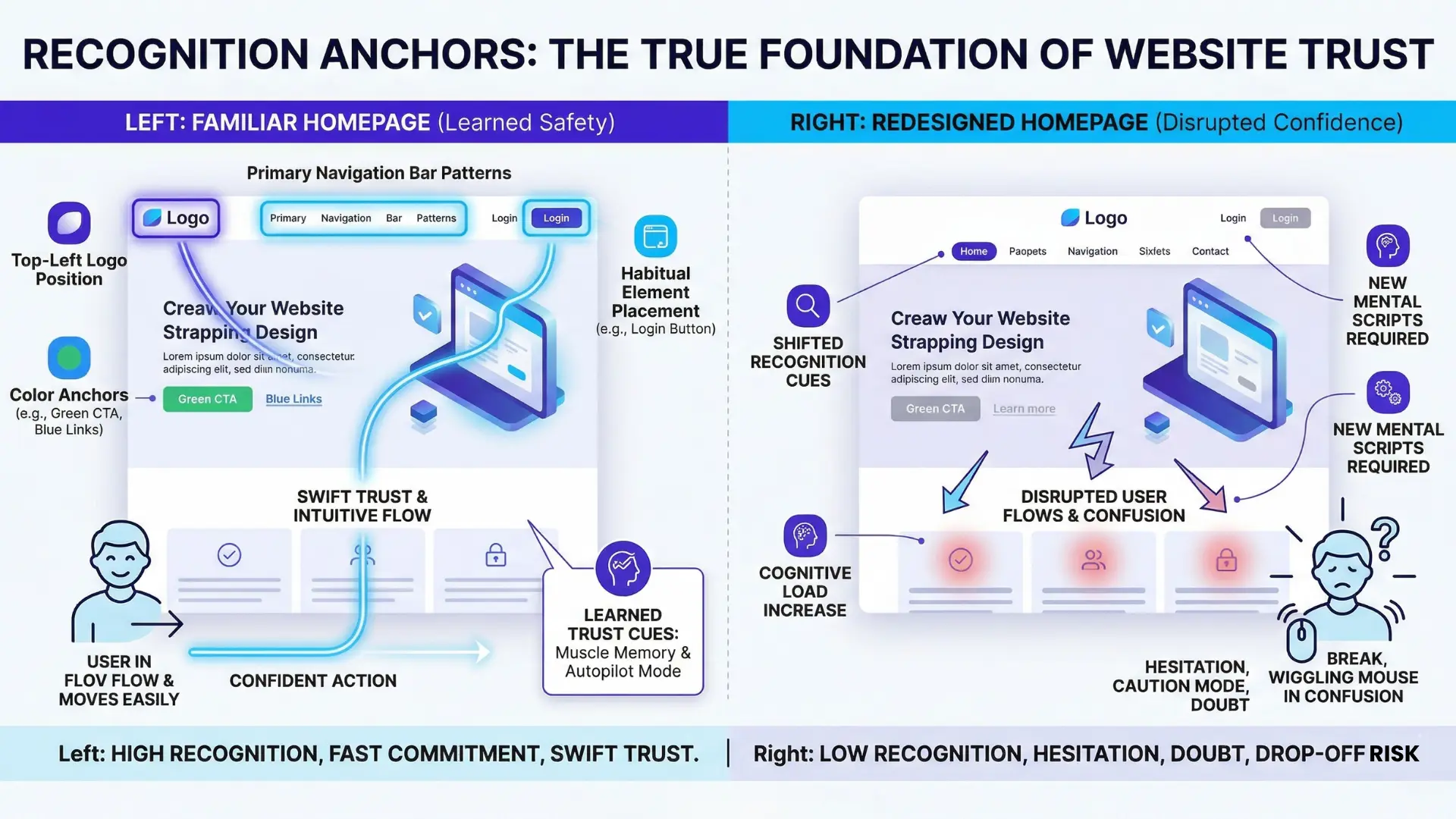
Cognitive cost of reorientation
Here’s a myth that holds teams back: “If people can still find what they need, change is harmless”.
Reality is much sharper.
Every unfamiliar arrangement creates what neuroscientists call cognitive load – the mental effort needed to process, adapt, and decide.
The cost?
Decision hesitation shoots up.
We’ve measured up to 38% longer time-to-click on CTAs after visual resets that stripped out known patterns.
One insurance site saw support chats with phrases like “Is this the right place?” nearly double the week after launch.
Unfamiliarity doesn’t just slow people down.
It makes them doubt both their memory and your intent.
Visual change chips away at intuitive flow: a user looking for that blue help icon now scans the whole screen, frowning, hunting.
It’s like swapping the driver’s side in your car overnight.
You’ll get home, but sweat a little more at every intersection.
The practical outcome: users don’t just hesitate, they sometimes abandon.
The trust reset isn’t subtle – it shows up in faster bounces, more contact requests, and a drop in self-service tasks.
Frameworks like the BJ Fogg Behavior Model remind us: make it harder, require new mental scripts, and motivation must spike just to break even.
Most of the time, it doesn’t.
Recognition builds safety.
Strip it away, and you force users into caution mode – right at the moment you want commitment or conversion.

Redesign as False Progress: System Preservation Beats Visual Novelty
Imagine investing six figures to redesign your site and seeing conversion rates drop.
How does a new coat of paint lead to lost revenue?
Cosmetic website updates – color palettes, modern fonts, trendy hero images – promise innovation.
But the real threat isn’t how things look; it’s what stays broken under the surface.
One client refreshed their homepage, but the site’s product-finding paths remained as confusing as before.
Users left faster, not slower.
It’s like renovating the lobby while the building’s fire alarms still malfunction.
The trap of “modern updates without intent clarity”
Here’s the trap: if your core intent system (the architecture connecting user goals to business value) leaks, then graphic updates do nothing for trust or growth.
The behavior we’ve observed isn’t anger – it’s quiet abandonment.
Familiar visitors don’t even voice complaints; they just vanish, taking their wallets elsewhere.
Why?
Because a redesign that preserves weak or ambiguous direction gives the illusion of progress, while lost trust cues actually magnify every navigation flaw.
The myth: “Modern visuals automatically win trust”. In practice, users scan with laser memory for learned trust cues. Break those and the numbers nosedive, no matter how clean your CSS.
Relearn vs regain: misaligned investment
Redesigns often demand users relearn pathways they’ve already mastered.
Think about the frustration of car controls moving with every new model – sound familiar?
Now, scale that annoyance to thousands of users onboarding again for no visible benefit.
With one financial client, their ambition was growth, but after a major UI overhaul, support inquiries doubled.
The only real change?
Users couldn’t recognize where to execute transactions.
Familiarity bias in website redesign isn’t just about preference.
It’s a measurable behavioral tax: drop-offs rise, task completion times spike, and your most loyal customers hesitate or leave.
So ask yourself: Is your redesign inviting users back to trust – or handing them a confusing map with all the landmarks erased?
It’s the digital version of moving the grocery store aisles overnight.
Users don’t feel delight.
They feel lost. No change in fonts, grids, or gradients can buy back lost safety.
System preservation means fixing core intent fulfillment, not just decorating what’s already failing. Until then, every pixel of novelty adds friction, not trust.
Focusing on intent first will always give your next move compound impact, while chasing novelty alone only masks leaks that cost far more in the end.
Summary: Visual novelty alone does not repair systemic navigation or trust failures – redesign trust reset risks rise when recognition, intent signals, and familiar flows are broken.

Behavioral Fallout: Returning Users and Conversion Decline
Ever wonder why returning users drop off just after a redesign, even when every focus group praised the new look?
Three days after one client’s long-planned visual refresh, returning customer logins dropped 21% – but new users kept converting at the same old rate.
There’s a silent breach in trust happening that nearly every A/B test misses at first glance.
Ask yourself: what seems fresh to your design team may feel risky to your most loyal audience.
Metrics of mistrust: conversion, bounce, hesitation
Conversion drop after a redesign isn’t a mystery – it’s a tell.
Watch as regular users stall on the homepage two beats longer or freeze mid-checkout.
The bounce rate on returning traffic jumps, sometimes by double digits, but heatmaps show the real story: repeat visitors wiggle the mouse or tap around icons they used to trust.
Friction appears in milliseconds, but the sales impact compounds in weeks.
Clients often ask why loyal users react harder; it’s because a redesign upends their sense of mastery, not just their memory of a button’s color.
One analogy clients remember: redesigning trusted navigation is like moving the light switch in your own kitchen.
You’re forced to grope in the dark – right when you least expect it – making you wonder if it’s even the right house.
Suddenly, every habitual action is work.
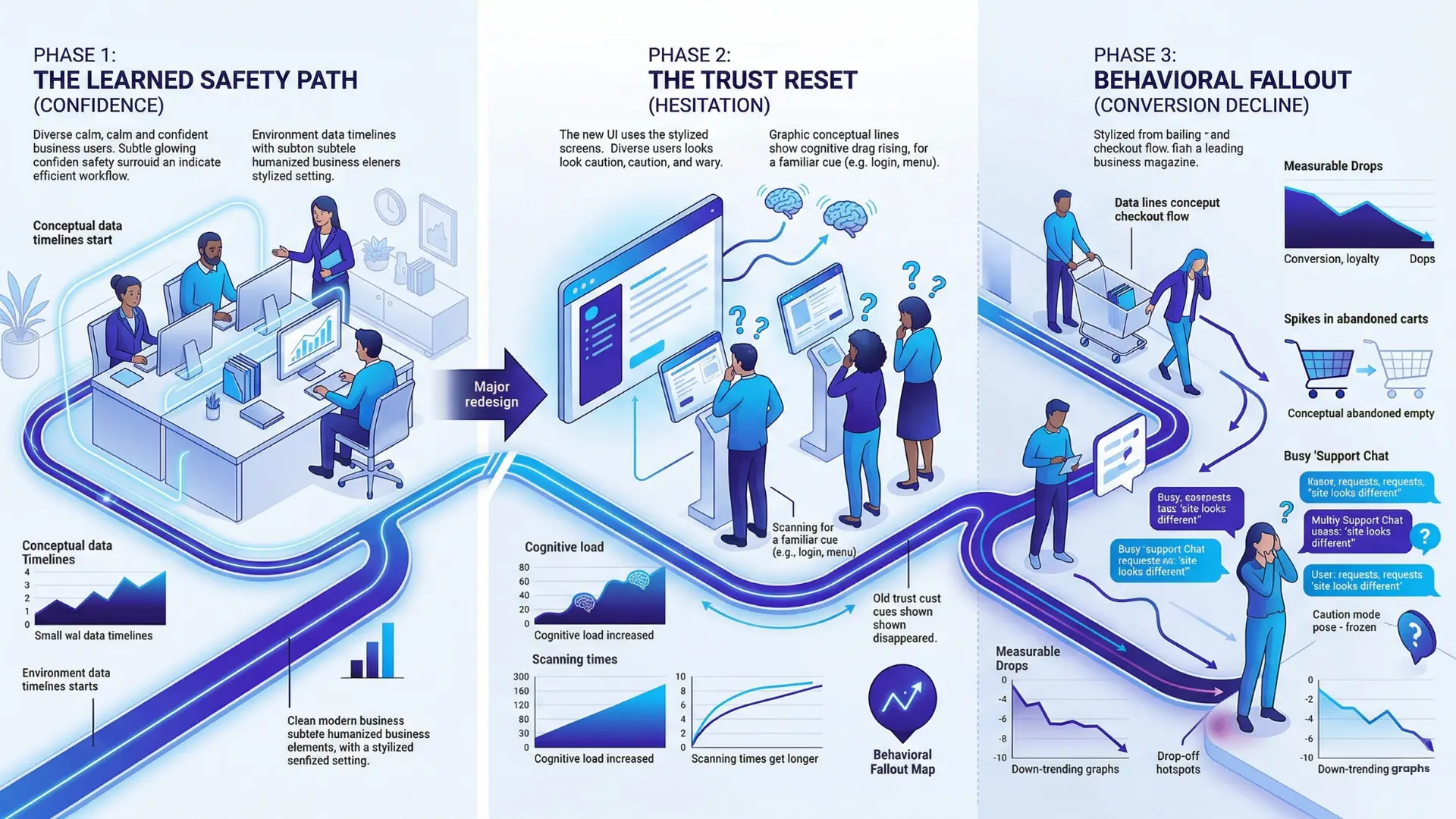
Signal breakdown: what users relied on is now gone
Critical Recognition Cues and Their Impact on User Trust
| Symptom | Diagnostic Action | Focus Area |
| Conversion drop post-redesign | Check changes in critical recognition cues | Recognition cues (buttons, icons, color anchors) |
| Spikes in legitimacy/support queries | Audit placement and labeling of habitual elements | Element placement and labeling |
| User friction or abandonment in return paths | Map return visitor paths for new friction or drop-off | User paths and navigation flow |
In real projects, the smallest vanished cue creates palpable anxiety.
One SaaS platform swapped icons for trendy shapes and lost its old call-to-action contrast. Power users emailed within hours: “Where did it go?”
The most disruptive trust resets follow loss of:
- Persistent login buttons (a single pixel shift, months of lost conversions)
- Familiar menu patterns (old muscle memory, gone forever)
- Color-coding for plan comparisons (sudden confusion, more abandoned carts)
People aren’t just missing graphics.
They’re experiencing a breach in learned trust.
Metrics spike, but the root cause is deeper – confidence shaken by a sudden visual change, not intent. Is a trust reset ever worth the drop, or is the real leakage in invisible cues your audience depends on?
The erosion of learned safety leaves visible footprints: micro-hesitations, silent drop-offs, and direct user complaints.
The story metrics tell is blunt – trust resets punish familiarity, while loyalty depends on recognition.
Next, we’ll connect these lessons back to designing intent-driven environments that protect user confidence from disruption.
Summary: Returning users show the sharpest dip in conversion post-redesign, directly linked to loss of learned trust cues and new disorientation.

Linking Trust Reset to Intent-Containment Architecture
Definition: Redesign trust reset occurs when returning users must re-learn navigation and recognition, disrupting confidence and conversion.
Pages as environments, not layouts
Ever wonder why a page that “looks better” can still feel wrong – and leave conversion numbers lower?
The missing link is this: Users don’t just notice what’s changed – they sense what’s been erased.
Pages function as environments, not as visual layouts.
Familiarity bias is confidence-in-action.
When trusted recognition cues – placement, buttons, color anchors – vanish, users feel displaced, hesitate, or leave, regardless of superficial improvements.
Diagnostic path: when to re-evaluate structure, not aesthetics
Post-Redesign Diagnostic Guide for Trust Reset
| Recognition Cue | Description | Impact if Changed |
| Persistent login buttons | Consistent placement and appearance of login; muscle memory built over time | Loss leads to reduced conversions after even slight positional changes |
| Familiar menu patterns | Expected navigation structure and layout users rely on | Disappearance results in task delays, higher drop-offs |
| Color-coding for plan comparisons | Use of consistent colors to differentiate plans or features | Confusion increases cart abandonment and hesitation |
Are you fixing the paths users follow, or just repainting the scenery?
The most damaging leaks are mismatches between user intent and the site’s structure, not just visuals.
Use diagnostic frameworks: track conversion drops, bounce, and task friction after launches, replay user sessions, and isolate recognition failures.
Most redesigns preserve the same broken system.
Sometimes, restoring a lost button works better than overhauling visuals.
Trust resets only heal if the environment matches intent through recognition and stability.
Diagnostic guide:
- Experience a conversion drop post-redesign? Check changes in critical recognition cues first.
- See spikes in support/chat queries about site legitimacy? Audit placement and labeling of habitual elements.
- Map return visitor paths for new friction or abandonment before considering more design changes.

Scientific context and sources
The sources below provide foundational context for how decision-making, attention, and performance dynamics evolve under scaling and constraint conditions.
- Visual Design and Trust Cues
Design for Trust: Information and Online Purchase Decisions – B.J. Fogg – Communications of the ACM
Explores how interface design and visual cues influence user trust and purchase decisions, providing early empirical frameworks that align with trust resets in redesigns.
https://cacm.acm.org/research/designing-trust-into-online-experiences/ - Familiarity, Recognition, and Cognitive Load
Recognition Memory: A Review of the Use of Receiver Operating Characteristics – Andrew P. Yonelinas – Journal of Experimental Psychology
Reviews recognition memory mechanisms, directly relevant for understanding how changes disrupt learned cues and elevate cognitive load in digital contexts.
DOI: 10.1037/0033-2909.133.5.800 - Swift Trust and Behavioral Biases
Swift Trust in Temporary Groups – Debra Meyerson, Karl E. Weick, R. M. Kramer – Organizational Behavior and Human Decision Processes
Defines “swift trust,” the mechanism by which users quickly accept or reject unfamiliar environments, core to the trust reset effect during redesigns.
https://academic.oup.com/book/52385/chapter-abstract/421279830 - Website Redesign and User Experience
Usability Engineering – Jakob Nielsen – Morgan Kaufmann
Provides authoritative evidence on how usability and the preservation of recognition patterns determine the success of website redesigns, referencing cognitive cost and recognition anchors.
https://www.elsevier.com/books/usability-engineering/nielsen/978-0-12-518406-9 - Cognitive Load Theory and Online Performance
Cognitive Load Theory: Implications for Learning, Teaching, and Design – John Sweller, Paul Ayres, Slava Kalyuga – Springer
Clarifies how increased cognitive effort from lost familiarity in interfaces impairs decision speed and accuracy, foundational for understanding post-redesign conversion trends.
https://link.springer.com/book/10.1007/978-1-4419-8126-4
Questions You Might Ponder
What is a trust reset in website redesigns?
A trust reset refers to the abrupt disruption of user trust caused by major design changes, especially when familiar elements like logos or navigation are moved or removed. This forces users to re-evaluate site credibility, often reducing conversions and increasing bounce rates.
Why do conversion rates often drop after a site redesign?
Conversion rates dip post-redesign primarily because returning visitors lose recognition cues they rely on for confidence and speed. When familiar elements are altered or missing, users hesitate, reorient, and sometimes abandon the site due to elevated cognitive load and mistrust.
How do businesses measure the impact of lost recognition cues?
Businesses typically measure post-redesign trust resets through metrics like rising bounce rates, declines in return visitor conversions, increased support queries about legitimacy, and longer times-to-click on familiar actions. Heatmaps and session replays also expose new friction points tied to lost cues.
What are the psychological effects of changing familiar website elements?
Altering familiar website elements increases cognitive load and triggers suspicion, impacting swift trust. Users must expend more mental effort, leading to hesitation, micro-hesitations in navigation, higher support needs, and, ultimately, a negative impact on loyalty and conversions.
How can brands prevent trust resets during redesigns?
Brands can prevent trust resets by auditing and preserving key recognition cues, such as consistent login button placement and color schemes. Gradual changes, robust user testing, and monitoring behavioral metrics ensure updated designs support user confidence rather than disrupt it.