What You’ll Learn
redesign vs behavior
Key Takeaways
- Redesigns rarely improve conversions unless they address underlying user intent and trust rather than aesthetics alone.
- Behavioral disruption often causes productivity drops, trust erosion, and lost revenue when learned user patterns are ignored during redesign.
- Real conversion gains occur when intent mismatches are diagnosed and rectified before making visual changes.
- In regulated industries, preserving clarity and behavioral continuity is essential to maintain trust and avoid unintended compliance risks.
Redesigns often fail to improve conversions because user behavior is driven by intent, risk, and expectation continuity – not just by improved aesthetics.
Changing a site’s appearance, without repairing underlying motivation or decision systems, seldom leads to measurable outcome lift.
This article diagnoses the key behavioral, trust, and system-level reasons visual changes do not produce the results teams expect.
Why redesign fails to improve conversions: When visual change ignores user intent and trust factors, conversion rates remain flat.
This phenomenon is known as “redesign behavior mismatch”.

Why Redesigns May Feel Like Progress – But Don’t Drive Behavior
Imagine you launch a brand new site – all fresh, beautiful, and loaded with the latest design trends.
But here’s the question nobody expects:
Why do conversion rates often stall, or even dip, after a redesign?
We’ve seen this happen in at least half of the “visual lift” projects pitched as quick wins.
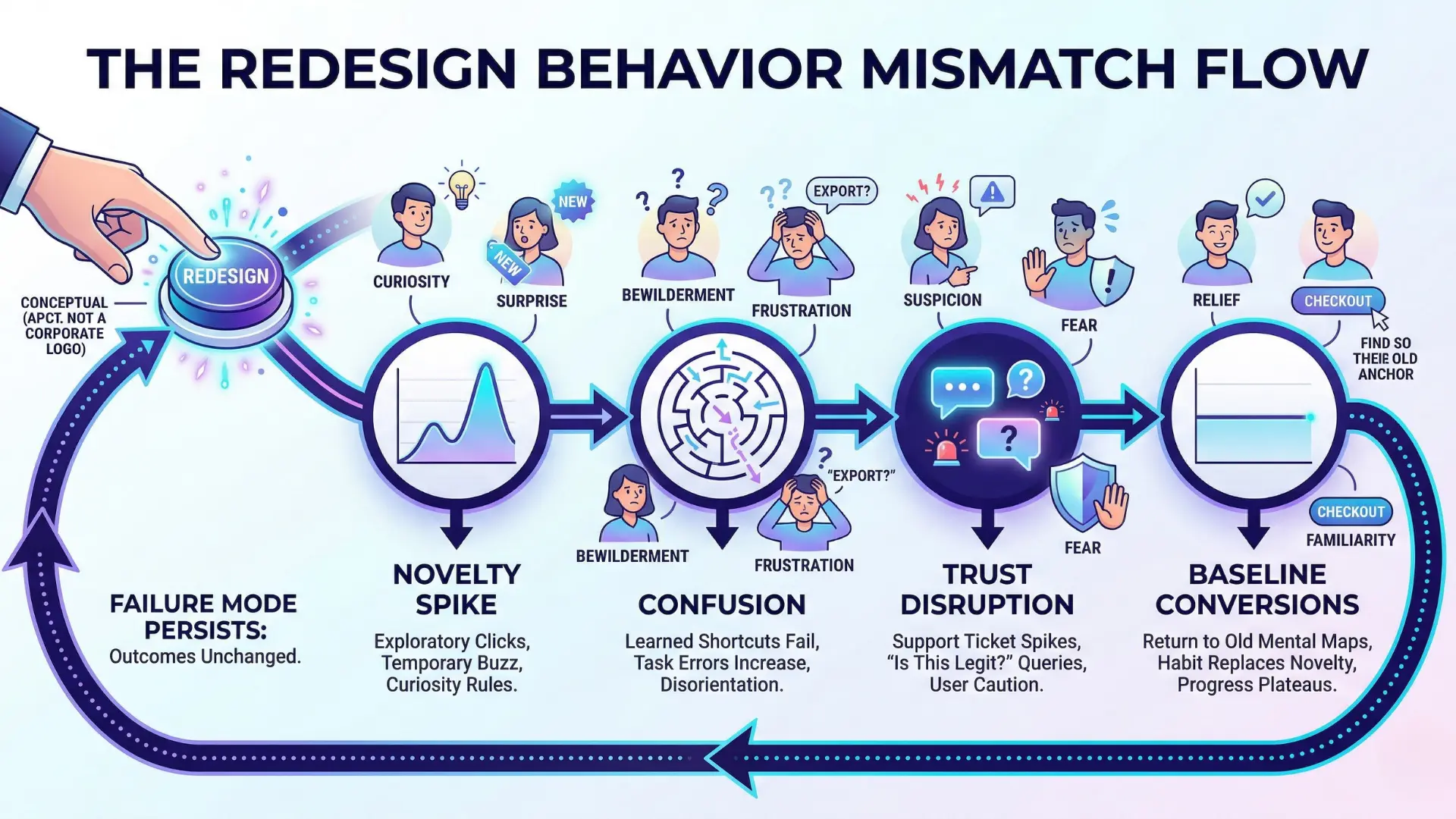
The initial spike in engagement is usually a mirage.
People explore the new look, maybe click links that didn’t draw attention before, but curiosity dries up in days.
A client in SaaS told us their bounce rate improved for one week, then snapped right back to baseline. The novelty effect fades fast, and so does momentum.
The ‘New Look’ Momentum Trap
It’s like repainting a busy airport sign – passengers may notice the color change, but if the directions don’t change, foot traffic flows exactly as before.
The same user paths, the same drop-offs. And here’s the twist: people subconsciously favor their learned interaction patterns, no matter how catchy the redesign.
Does your gut say a slick UI always means better results? The data whispers otherwise.
Unchanged Intent, Unchanged Outcomes
At its core, why redesign fails to improve conversions is simple: user intent acts as gravity.
Unless you move the true source of motivation, behavior won’t shift.
We’ve witnessed teams obsess over button shapes, icon sets, color theory – only to discover, weeks later, that “conversion” metrics stubbornly refuse to budge.
It’s not just frustrating.
It drains budget, time, and team energy.
Here’s what separates outcome drivers from mere decor: intent systems.
These are the invisible contracts guiding action – reasons users arrive, expectations they carry, shortcuts they rely on to finish tasks.
If you don’t address why someone clicks (not just what they see), you replay the same behavior under a new coat of paint.
One ecommerce client swapped their entire category navigation, expecting higher sales; six months later, their top-converting journeys looked exactly the same.
Visual change no conversion lift.
Think of behavioral intent as a river.
You can change the color of the banks, but unless you redirect the current, the water finds its old channel.
Ever tried moving a river with a paintbrush?
Here’s a myth worth busting: “If it looks different, they’ll act differently”.
In reality, intent-driven behavior change requires touching the actual reasons, risks, and payoffs hardwired into user goals.
A new interface can even introduce friction if it disrupts learned user behavior without realigning with user intent.
Progress isn’t just about change – it’s about changing the right thing.
To catalyze better outcomes, you must start where intent lives, not where decoration ends.

Behavior Is Driven by Intent, Risk, and Familiarity
Learned Efficiency and Trust as Assets
Returning users rely on predictable flows – they build trust from repeated, efficient interactions. Moving elements or changing names disrupts these learned shortcuts, often forcing trusted users to slow down or abandon tasks.
Even small UI changes can produce immediate drops in efficiency and trust.
Example: repeat users in a SaaS app needed triple the time to complete a standard task after a simple layout switch.
Risk Perception vs Aesthetic Novelty
Some leaders fall for the idea that a “fresh coat of paint” inspires action.
But real users often care less about novelty and more about risk.
The brain is wired to favor the known over the unknown. In practical terms: if too much changes at once, a buyer’s intent collides with sudden uncertainty.
One vivid observation – we watched as new landing page visuals initially sparked more clicks, but bounce rates rose within days.
Temporary curiosity (the so-called novelty effect) gave way to hesitation.
People want to trust that what they see reflects what they intend to do, especially with complex or high-stakes actions.
Think of it like wearing a new pair of glasses: colors might pop, but if the prescription is even slightly off, every step feels risky until you recalibrate.
Most redesigns overlook the slow recalibration period for real-world users.
Can a group of visual changes, alone, genuinely shift behavior when underlying intent stays anchored in habit and trust?
The answer is no – visual change without intent-driven adaptation often leads to conversion plateaus or even a slow decline.
Clarity, trust, and habit shape every digital behavior.
Redesigns that ignore these foundations risk trading short-lived novelty for long-term friction.

Failure Modes: How Redesigns Break Intent Systems
Navigation and Cognitive Load Disruption
Diagnostic Signs of Navigation and Cognitive Load Disruption:
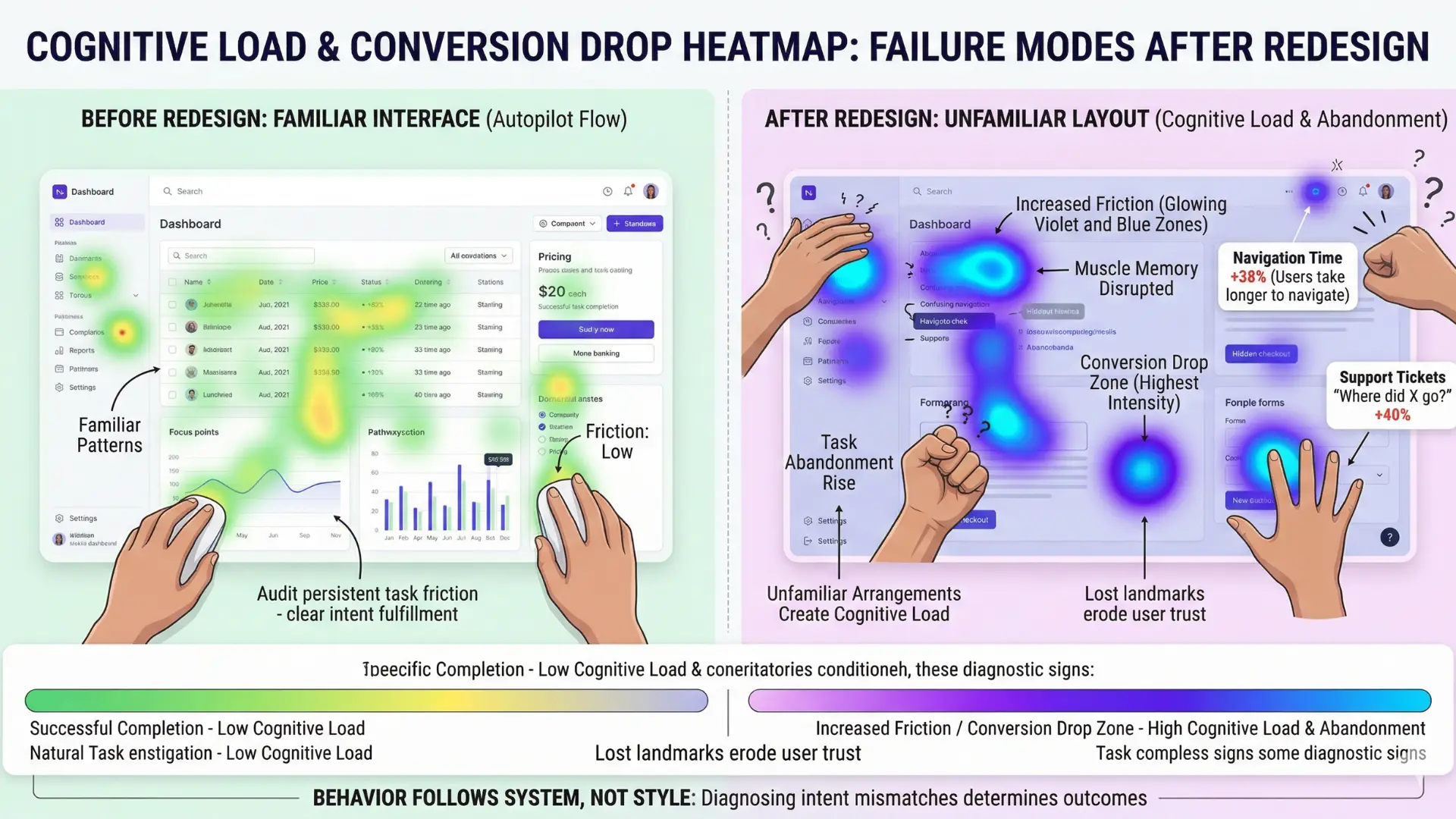
- Users take longer to navigate familiar flows
- Sharp rise in support tickets related to “where did X go?”
- Conversion drop immediately following navigation/layout shift
Diagnostic Signs of Navigation and Cognitive Load Disruption
| Criteria | Description | Why It Matters |
| Confirm persistent task friction | Identify ongoing friction, abandonment, or confusion linked to user intent | Ensures redesign addresses actual behavior barriers, not just aesthetics |
| Collect evidence on trust/navigation confusion | Verify trust elements or navigation clarity issues affecting conversions | Targets core behavioral drivers for improvement |
| Match engagement drops to specific points | Localize where in the user journey issues occur versus uniform decline | Focuses redesign efforts on high-impact areas |
Imagine launching a gorgeous new site, only to watch conversions drop in week one.
If the menu, links, or overall structure change, users’ “I know where everything is” mental map disappears instantly.
The myth?
That a cleaner navigation always makes things simpler. In practice, even a two-step move of a signup button can trigger deep confusion.
A recent client learned this the hard way: their product selector’s new flyout menu looked stunning, but regular users spent twice as long searching for familiar categories.
One exec said, “But it’s all still here!”
Maybe for the design file, but not for the muscle memory people built up over months.
That’s the essence of cognitive load – every unexpected change quietly pushes the brain to work harder. It’s like moving all the light switches in your house and expecting nobody to miss a step at night.
When learned user behavior and interface design fall out of sync – what some call a “redesign behavior mismatch” – people hesitate, backtrack, or even leave.
We’ve seen intent-driven behavior bend under the weight of small visual tweaks.
If the navigation flows don’t contain and direct intent immediately, lost paths appear – and with them, lost revenue.
SEO, Analytics, and Measurement Regression
Diagnostic Signs of SEO, Analytics, and Measurement Regression:
- Organic traffic or key page rankings drop post-launch
- Analytics dashboards show measurement gaps or data loss
- Internal links or redirected URLs missing, causing orphaned pages
Here’s something few teams see coming: a redesigned site tanks their search presence or reporting clarity for months.
Mismatched URLs, broken internal links, orphaned pages – the list adds up fast.
One client’s visual refresh replaced headings and button labels en masse but left analytics tags behind, so core behaviors stopped tracking.
For two quarters, they had pretty dashboards but almost no visibility into what users actually did.
Think about it: would you chart a new city map for tourists, but forget to update street names and road signs?
That’s how Google (and your analytics tools) get lost in a redesign.
Visual change with no conversion lift becomes a costly trap, and measurement regression sets back every future optimization project.
The real risk is letting the “new look momentum” blind teams to gaps in data and discoverability.
And when measurement is partial or broken, even the best intentions land as guesses, not insights.
One small detail – like shifting a popular resource to a new path without redirecting – can break both user journeys and tracking sequences instantly.
Fast, visible changes are seductive.
But each layer of disruption in menus, flows, and measurement compounds confusion.
Diagnosing the causes of conversion decline always starts with mapping these breakdowns before blaming the design itself.

Trust Reset: When Familiarity Becomes Friction
Recognition Loss as Friction Multiplier
Failure Indicators of Recognition Loss as Friction Multiplier:
- Repeat users show increased time to task completion
- Task abandonment rises among previously loyal user segments
- Notable increase in hesitation/confusion at previously clear steps
Imagine logging into your go-to analytics platform.
The interface looks…new.
Shiny buttons, shifted menus, fresh colors.
But your mind draws a blank – where did “Export” go?
In that moment, your learned behavior stops working.
Here’s the part that catches almost every executive by surprise: trust doesn’t collapse all at once.
It erodes bit by bit, on each click that fails or each cue that feels wrong.
We’ve seen this firsthand with ecommerce redesigns.
One retailer did a full site overhaul, betting on bolder graphics and trendier type.
The first spikes in bounce rate didn’t come from new users (who skimmed, then left if uninterested), but from loyal buyers who suddenly hesitated on the checkout path they used dozens of times.
Small shifts – like relabeling “Proceed” to “Continue” – created a ripple effect.
Familiarity is a sense memory: when it vanishes, mental effort rises, and momentum fades.
Why? Because recognition isn’t just comfort, it’s a navigation map burned into muscle memory.
Take away the map, and you instantly double the cognitive steps required.
Executives often expect novelty to spark delight, but learned user behavior resists friction, not boredom. Is your next redesign actually solving a pain, or just breaking old cues your best customers need?
Productivity Drop for Repeat Visitors
Friction is visible in numbers. One SaaS platform measured repeat user productivity before and after a major redesign.
The metric was simple: time to complete a standard task.
After rollout, repeat users took 26% longer, on average, to accomplish the same work.
Support tickets with “Where did X go?” language spiked 40%.
Efficiency – the hidden engine behind retention – sputtered.
That’s not a one-off.
For a multi-location service brand, their redesign aimed to “streamline” the booking process. Instead, loyal users reported confusion “What happened to the location filter?”
Task completion dropped from under two minutes to over three.
These aren’t small pains. Each lost minute is another reason for a repeat visitor to try a competitor.
Redesign isn’t like repainting a door; it’s more like rearranging the entire neighborhood overnight.
Even minor tweaks send users searching for landmarks they used to trust (and every extra search is a trust withdrawal).
Loss of visual recognition creates invisible walls.
Every new interface element asks users to relearn something.
The more they have to relearn, the harder it is for trust and conversion rates to recover.
Trust fades fastest when recognition vanishes.
Guard it tightly, or expect productivity – and conversion – to drop until users rebuild their mental maps.

Intent System Preservation Wins (Conceptual Corrective Paths)
Detecting Intent Mismatch First
What if your users already told you – quietly – why redesign fails to improve conversions, but nobody stopped to listen?
Most teams rush to visual change, chasing faster load times or sleeker UI elements.
Here’s the punchline almost nobody expects: even dramatic redesigns produce no conversion lift if the intent system stays broken.
The redesign behavior mismatch sneaks in when changes happen before leaders ask, “Do we know what drives user action, or are we projecting our own preferences?”
With several B2B clients, we’ve seen conversion rates stall or even fall after branding upgrades – because Hotjar scroll maps revealed the same drop-offs at decision walls as before.
In one case, a fresh palette and type treatment wowed the board, but analytics showed repeat visitors now took longer to find their usual menu path.
Turns out, what felt like progress to the team never touched the real behavioral bottleneck.
It’s like repainting a maze the mouse already mastered – unless you move the cheese, running in circles just gets more colorful.
The true leverage comes from catching intent mismatch early.
Are visitors abandoning your form because of cognitive friction, or because their information goals aren’t met?
Short of heavy research, even brief session recordings let you sense mismatch: frantic clicking, short dwell followed by exits, or uncompleted journeys.
Sonic cues in real user feedback often reveal gaps between expectation and flow.
Pausing for this intent audit makes you the architect who pauses before pouring new concrete – not the one who builds before checking if the pipes fit.
When Redesign Makes Sense (Strategic Criteria)
Strategic Criteria for When to Green-light a Redesign
| Symptom | Description | Impact |
| Longer Navigation Times | Users take more time to complete familiar flows | Reduced efficiency, increased frustration |
| Support Ticket Spike | Increase in queries about missing features or navigation | Indicates user confusion and lost muscle memory |
| Conversion Drop | Immediate decrease in conversion rates following layout changes | Revenue impact and lost opportunities |
You may be asking: if visual change can backfire, when does it actually help?
Redesign only supports conversion when it repairs or strengthens the existing intent system.
One marker: repeated user confusion that’s diagnostic, not cosmetic.
For example, if users misinterpret core calls-to-action or miss trust elements – because their intent is present but invisible barriers hijack the flow. In a growth SaaS account, our team witnessed a 15% drop in trial starts after a menu shuffle, but a 22% lift after restoring a familiar sign-up prompt plus validating through trust badges.
Think of the process like a mechanic listening for engine knocks, not just detailing the car.
The behavior doesn’t improve unless the system behind it is fixed.
Diagnostic Decision Framework:
- Confirm persistent task friction, abandonment, or confusion aligns to intent barriers – not design preferences.
- Collect evidence that trust indicators, navigation clarity, or calls-to-action are misunderstood.
- Match drops in engagement to specific points, not a uniform post-launch decline.
- Review user feedback for explicit statements about unmet goals, not just UI complaints.
- Only green-light a redesign when intent-system repair precedes visual overhaul.
Here’s the myth: “Changing visual design changes how users act”.
The reality?
Only addressing their real reasons for acting (or not acting) shapes measurable lift.
Intent-driven behavior change isn’t paint – it’s the electrical wiring behind the scenes.
Winning redesign is not about boldness or consensus.
It’s about respect for what the user already knows, feels, and fears. Learn first, then change with precision.
Most losses start with the wrong diagnosis.
Preservation of intent clarity almost always predicts conversion resilience – even as everything else gets reimagined.

Scientific context and sources
The sources below provide foundational context for how decision-making, attention, and performance dynamics evolve under scaling and constraint conditions.
- Behavioral Economics and User Decision-Making
Nudge: Improving Decisions About Health, Wealth, and Happiness – Richard H. Thaler, Cass R. Sunstein – Yale University Press
Seminal book on how small changes in context (“choice architecture”) alter user decisions, providing deep insight into intent and default behavior in digital and real-world environments.
https://yalebooks.yale.edu/book/9780300262285/nudge/ - Trust and Familiarity in Online Systems
Health Misinformation in Search and Social Media – Munmun De Choudhury, Scott Counts, Eric Horvitz – DH ’17: Proceedings of the 2017 International Conference on Digital Health
Peer-reviewed study exploring how website familiarity and continuity directly impact perceptions of trust and engagement behavior.
https://dl.acm.org/doi/10.1145/3079452.3079483 - Cognitive Load Theory in Human-Computer Interaction
Cognitive Load Theory – John Sweller, Paul Ayres, Slava Kalyuga – Springer
Comprehensive academic text examining how changes in navigation and information structure can overload users, impacting efficiency and outcomes in digital flows.
https://link.springer.com/book/10.1007/978-1-4419-8126-4 - The Impact of Risk Perception on User Behavior
A Study on Perceived Risk & Trust in Online Shopping a Comparative Study Among Various Demographic Groups – Dr. Vinay Kumar, Anurag Asawa
Provides empirical analysis of how risk perception and changes in digital environments affect intent, decision-making, and abandonment.
https://papers.ssrn.com/sol3/papers.cfm?abstract_id=2820655 - UX Design, Habit, and System Resilience
Quantifying the Impact of Making and Breaking Interface Habits – Diego Garaialde et al. – ACM / International Journal of Human-Computer Studies
Empirical HCI study that quantifies how interface habits form through repeated interaction and how they improve speed and accuracy. Demonstrates that even simple UI habits significantly enhance user performance, but these gains are fully lost when interface changes disrupt learned patterns, forcing users to relearn interactions and causing measurable performance decline.
https://arxiv.org/abs/2005.06842
Questions You Might Ponder
Why do website redesigns often fail to improve conversion rates?
Website redesigns often fail to improve conversion rates because user behavior is driven more by entrenched intent and trust than by visual appeal. If underlying motivation or decision systems remain unchanged, even a visually upgraded site will see limited gains.
How does cognitive load affect user behavior after a redesign?
Increased cognitive load following a redesign can slow users down, cause confusion, and erode trust. When familiar navigation or task flows change, users face more mental effort, often leading to abandonment or decreased productivity.
What is the novelty effect in the context of digital product redesign?
The novelty effect refers to a short-term spike in engagement due to curiosity about a new look or interface. However, this boost quickly fades once the novelty wears off, and user behavior tends to revert to established patterns if no real behavioral drivers are addressed.
Why is intent system preservation crucial during digital redesigns?
Preserving intent systems during redesigns is crucial because user actions are anchored in motivation, trust, and efficiency. Disruptions that don’t solve core intent issues risk reducing conversions and undermining previously built user habits, making recovery slow and costly.
What are the risks of redesign in regulated industries?
In regulated industries, even minor visual or navigational changes can increase risk perception, erode trust, and disrupt high-stakes routines. Clarity, safety signaling, and continuity are essential, as sudden changes can lead to compliance issues and increased task abandonment.