What You’ll Learn
browse mode leakage
Key Takeaways
- Browse mode leakage misinterprets high engagement metrics as success, masking underlying issues with user commitment and conversion.
- Excessive choices in navigation lead to decision paralysis, diminishing the likelihood of users taking decisive action.
- User navigation and structured pathways are vital in guiding visitors toward decisions rather than passive browsing experiences.
- True engagement metrics should focus on conversions and commitment actions instead of merely measuring time spent or page views.
What if the most “engaged” users on your site are really just lost?
Here’s a counter-intuitive truth: A spike in page views, scroll depth, and time-on-site can signal failure – not success – if users leave without deciding.

What “browse mode” leakage means in intent‑based page systems
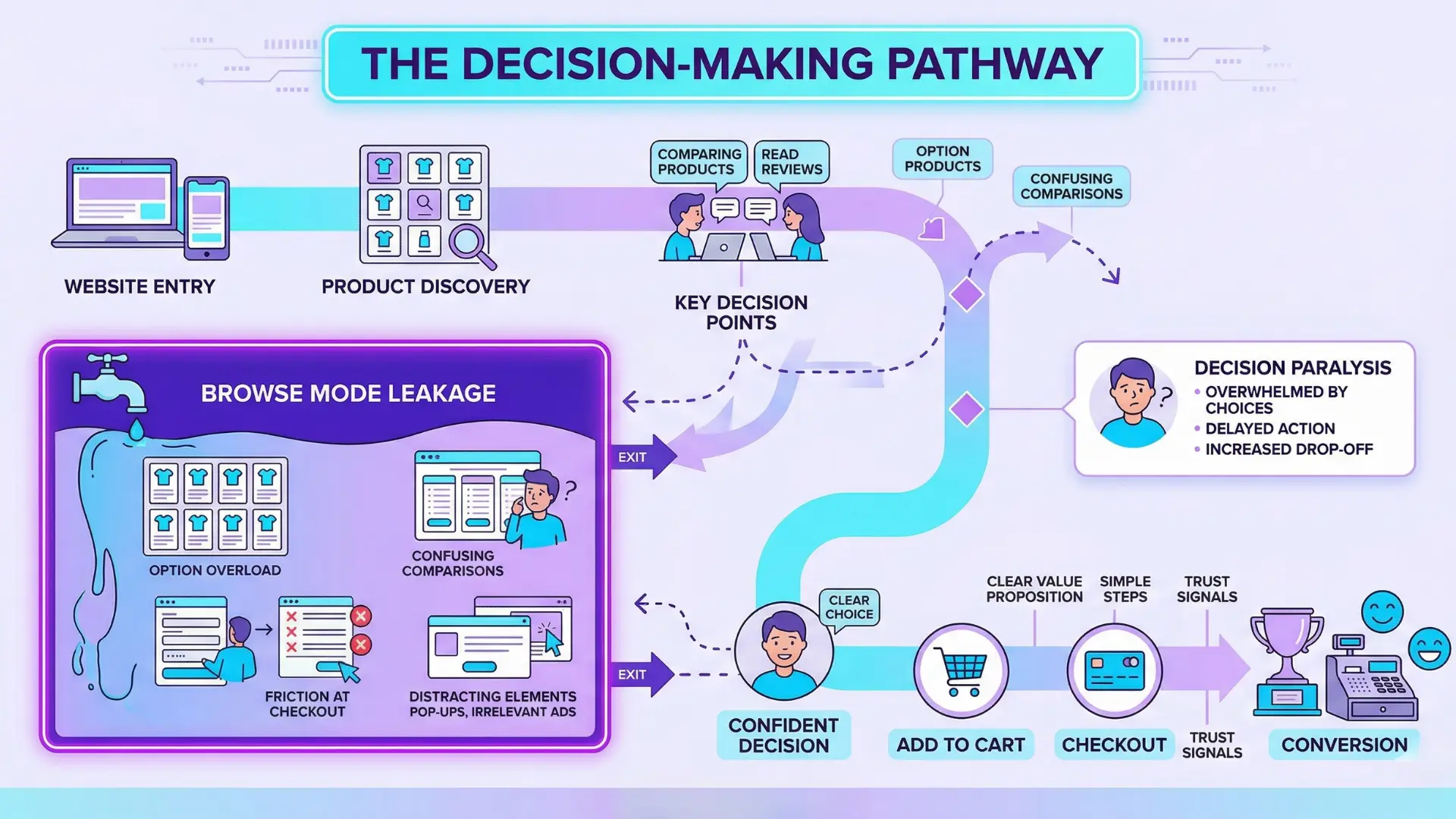
In digital intent systems, “browse mode leakage” is exactly that: the moment when users glide from one piece of content to the next, barely nudged toward a choice.
On paper, you see high engagement. In reality, you see browse mode website failure – where traffic skims the surface, but conversions never surface.
This problem isn’t just about bad navigation or cluttered menus.
It’s a gap in intent containment.
Users came for one answer, but your design let them wander, hesitating at every fork – a classic case of decision paralysis browsing.
I’ve seen sites with perfect product grids and beautiful flows fall prey.
One enterprise client, after investing six figures in content, saw bounce rates drop but conversions barely budge.
Users were busy, but never decisive.
The analogy? It’s like a museum with no exit signs.
Visitors admire every painting, lost in choice, but never arrive at the gift shop (where value gets captured).
Your site becomes a gallery – a place for consumption without conversion.
People remember what they saw but forget why they entered.
Here’s the myth: More exploration always drives better business outcomes.
The reality?
Option overload browsing quietly breeds hesitation, not commitment.
Every category, tab, and related link is another hall of mirrors.
I often ask execs: “Are we solving for decisions – or just more page loads?”
Their silence tells you everything.
Ever wonder why intent collision websites rarely scale profitably?
Because each additional option amplifies the browse-to-action gap. Instead of containing intent and routing visitors towards one next step, pages dilute action into endless exploration.
Content becomes the end itself, rather than a bridge to commitment.
So, if your dashboards glow with ‘engagement’ but not conversions, you might be winning the attention war and losing the action game.
Shortfall in intent containment isn’t always obvious – but it’s measurable and fixable.
Next, let’s map how decision signals get drowned out and why wandering often feels deceptively productive.

Definition: browsing as unresolved‑risk behavior
Imagine a user – poised to act, finger hovering – suddenly scrolling past the call-to-action and sinking into an endless chain of tabs and links.
What’s happening inside their head isn’t confusion; it’s unresolved risk.
Browsing becomes a stable default when the page doesn’t make the next action feel both obvious and safe. Instead of clear direction, the user senses ambiguity, so they retreat into low-consequence exploration.
In our agency’s client audits, this shows up like clockwork: pages with vague or competing prompts have bounce rates up to 40% higher.
Even with strong offers, if risk isn’t managed – think commitment, friction, unclear payoff – users will skim, wander, and never decide.
They aren’t lost.
They’re preserving optionality, shielding themselves from making a move that feels exposed or final.
Here’s the kicker – context switching is baked into our digital brains.
Evolution rewards exploring before committing (would you pick berries if you weren’t sure they weren’t poison?).
On a website, the same risk-averse circuit kicks in when nothing telegraphs: “This is the safe next choice”.
Is your site quietly telling visitors to wait and see?

How too much choice sustains browsing instead of routing
Impact of Navigation Structure on User Decisions
| Metric | What It Measures | Implication on User Behavior |
| Time on Page | Duration of visit | May indicate distraction |
| Scroll Depth | Percentage of content viewed | Could signal confusion |
| Page Views | Number of pages accessed | Often indicates browsing, not commitment |
| Click Rate | Clicks on specific CTAs | Better indication of intent |
You’ve probably seen a menu with dozens of options, or a services page listing every feature imaginable.
Sounds comprehensive, right?
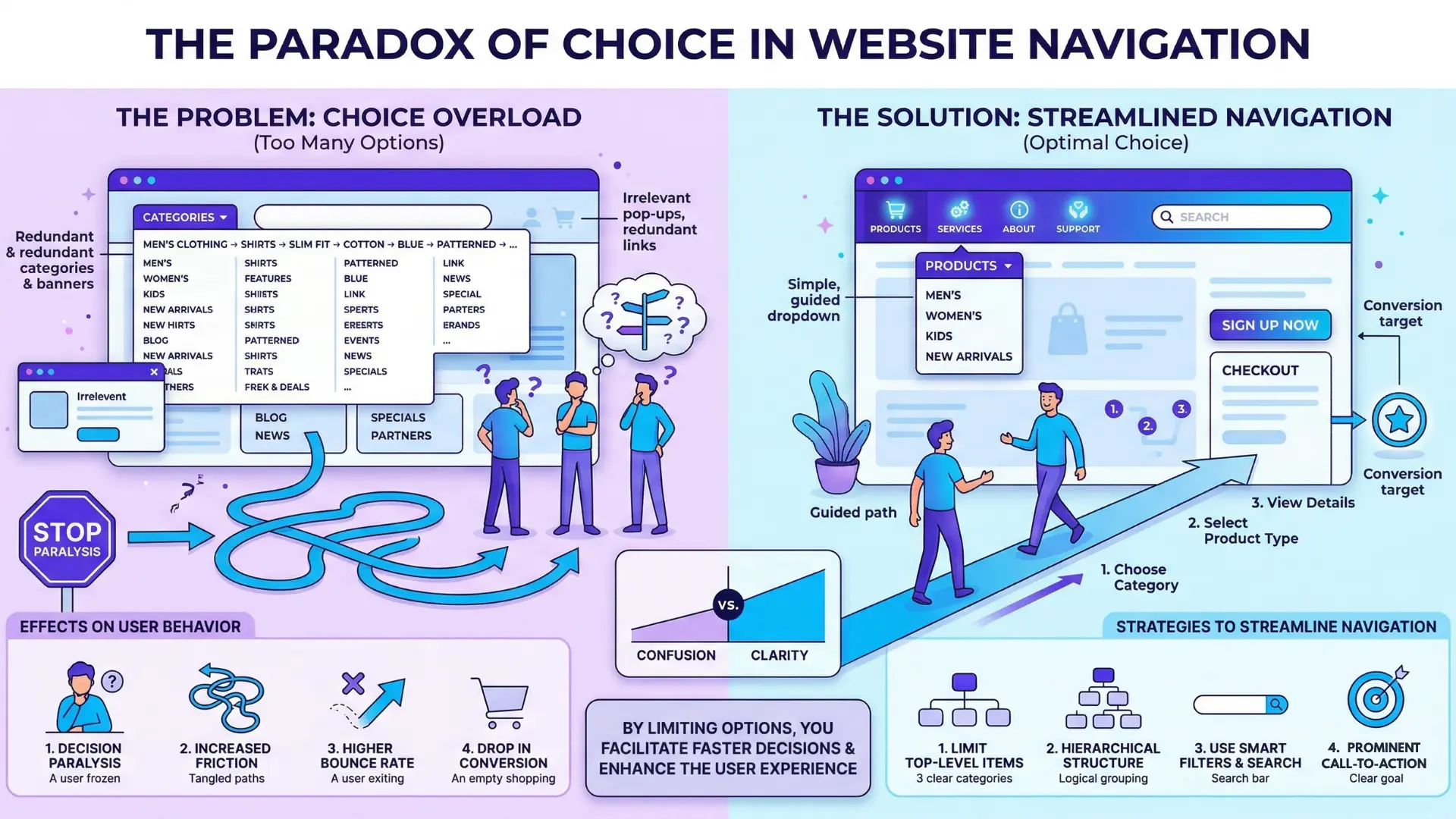
Yet the paradox: the wider your offerings sprawl, the more likely users slip into decision paralysis browsing – skimming endlessly, collecting info, never picking a lane.
We once overhauled a SaaS pricing page for a client drowning in feature grids and pop-out comparisons.
By limiting visible options and sequencing choices, conversion improved 28% over one quarter.
Too many routes diffuse attention and make action feel riskier.
Think of it like a streaming service with endless categories and titles – after twenty minutes, many users just give up and leave.
As noted above, option overload creates wandering.
Everest-sized menus and layered tabs don’t give a sense of mastery; they create ambient anxiety and pause.
Myth: “If we show them everything, they’ll see our value”.
In reality, this breeds intent containment failure – too many branches, none clear.
Tools like the Fogg Behavior Model can help spot where triggers are dampened by excess, not by lack.
Do you ever feel your own eyes glaze over picking from too many unfamiliar options?
Your audience is no different.
The lesson: browsing isn’t a “soft” behavior – it’s what happens when your page’s risk and choice signals are unresolved.
Next, we look at how structure and signals reward wandering instead of decision.

How websites unintentionally reward wandering
What if every click your visitor makes actually delays their decision?
Imagine a store where the exit signs keep moving.
That’s how most websites encourage browse mode leakage: by guiding users right back into more options, not toward a choice.
One founder I worked with was sure longer site visits meant higher intent.
But session recordings revealed a different pattern – users toggled between menus, compared features, and circled back.
Zero action signals.
Busy, blind wandering.
It looked like engagement. Really, it was decision paralysis browsing in action.
The trap? Nearly every site structure encourages exploration over commitment.
Global nav menus offer five, eight, twelve doors – none marked “next step”.
See a resource hub with ten submenu items?
Or sticky headers linking to every section at once?
Those are classic intent containment failures.
People default to consuming content, not converting.
Another client noticed robust content metrics but waning conversions.
By mapping click paths, we saw most users looping in a carousel of option overload browsing.
They dove into product grids, scroll endlessly through blog archives, or sample three service pages – then they left.
As noted above, option overload creates wandering.
It’s like a grocery store that keeps adding aisles but never signs for checkout.
Your website can feel comprehensive but actually fuels the browse-to-action gap.
Unintuitive truth: Giving more routes out doesn’t raise engagement quality – it breeds intent collision website patterns that keep decisions on hold.
Even high-value assets (like “ultimate guides”) risk causing content consumption without conversion if there’s no clear invitation to commit.
Think about this: When was the last time you abandoned a site after “just one more page”? That’s the wandering system at work – especially when every click is frictionless but directionless.
If your site’s structure often lets visitors choose “more” instead of “decide”, it quietly rewards wandering over action.
True engagement builds when you contain intent and design for decisions, not unending exploration.
Containment is the lever.
Reward progress, not wandering.
Next up: the traps of mixed intents and navigational escape routes.

Mixed intents and the exploration trap
Ever watched a user spend five minutes on your site – then vanish, without clicking anything that matters? It feels like real interest.
But what if that’s a symptom of “browse mode leakage”, not progress?
Here’s the catch: when a page tries to cater to too many possible reasons for visiting, it quietly builds a padded room for exploration.
One of our clients saw this first-hand.
They crammed whitepapers, webinars, product tours, and blog teasers onto a single “solutions” page.
Time on page spiked, yet trial sign-ups dropped by 18% over three months.
The more opportunities for passive learning, the less anyone reached commitment.
Mixed intent means you’re trying to serve conflicting motivations in one place: a buyer, a job-seeker, a researcher.
Each comes with different expectations and triggers.
Instead of moving forward, users meander.
It’s like designing an airport lounge where every exit leads to a different city – and most people get lost trying to decide where to go. Instead of deliberate, they default to aimless exploring. You might think: “Shouldn’t more options equal more conversions?”
It’s the opposite.
As stated, option overload browsing leads to paralysis.
The next step never feels obvious – so users loop back, or leave entirely.
Curiously, in user recordings, we’ve seen a pattern: each new choice resets attention and delays action, turning a conversion funnel into a roundabout.
That’s the exploration trap in action.

Navigation as escape, not decision support
Now, let’s talk about navigation.
The myth: more navigation always helps users find what they want.
Reality: more paths mean more exits, not more decisions.
One retail site we worked with expanded their navigation to “help” – adding advanced filters, mega-menus, persistent suggestion bars.
Click depth went up, but so did “content consumption without conversion”.
Most users wandered into side topics or product dead-ends, then bounced.
Instead of acting, they clicked themselves further from intent.
When navigation is presented as a playground – every possible route visible – it acts as an escape hatch, not a guide.
Think of a website as a train station: if there’s a departure sign pointing everywhere at once, confusion reigns.
People get engrossed in scheduling, not boarding.
Ask yourself: are your navigation options engineered to route toward outcomes, or just to show off content inventory?
The difference isn’t subtle.
Site structures that reinforce broad exploration amplify the browse-to-action gap.
Here’s a shortcut analogy: it’s like offering a restaurant menu with a hundred dishes and no recommendations.
The result?
Diners dither, hunger fades, and many leave without ordering.
Content and navigation can gently shepherd action – or they can reward endless wandering. Most accidental browsing happens by design, not mistake.
When mixed intent and unfocused navigation combine, browsing flourishes but conversions don’t.
Next: what looks like healthy engagement might be camouflaged leakage.

Why browsing feels like engagement – but isn’t progress
Ever notice the spike in page views and scroll depth after a major site update – yet conversions barely budge?
Most teams see a dashboard packed with “active sessions” and breathe easy.
But here’s the uncomfortable question: when does browsing become a distraction from the real goal – action?
High engagement can mask browse mode leakage. It’s easy to misread long sessions as success.
In practice, we’ve worked with SaaS clients who celebrated 40% more average session time post-redesign. The problem? Their form fills and demo requests went flat.
One e-commerce customer was thrilled by a 30% traffic increase – until they realized half those users looped endlessly between category and filter pages, leaving without a single item in their carts.
Why does this happen?
Browsing activates a comfortable, low-stakes mindset.
The user enjoys a sense of discovery, like walking through a bookstore without needing to buy.
Metrics – time on page, scroll depth, pageviews – glow green.
But real progress (decision, signup, transaction) stalls. It’s like counting footsteps in a maze instead of exits found.
Does high engagement mean people want what you’re offering, or just that you’ve created a content playground?
Teams often confuse exploration with intent.
The myth goes: “If people spend time here, it means we’re adding value”.
But in reality, high dwell time can signal unresolved risk or confusion.
Imagine a grocery store where customers wander for hours but never check out – would you consider that a success?
We’ve seen this firsthand. During a B2B audit, one CEO bragged about “record engagement”.
Our analysis showed decision paralysis browsing: users scrolled, clicked, and left with empty hands.
The more options and content, the more users lingered – without deciding.
Here’s the twist: engagement metrics are like the shimmer of quicksand.
They look solid but don’t support real progress.
Want to know the only numbers that matter?
Conversions, commitments, and decisive actions – however modest.
If your dashboards reward wandering, you’re missing the actual signal: progress toward a decision.
You can’t steer strategy by watching dashboard lights.
Progress isn’t measured by attention alone – it’s the shift from looker to doer.
Next, let’s see how behavior cycles reinforce browse mode and where metrics blind spots emerge.

Browsing vs Engagement: The Diagnostic Distinction
Definition: Browsing refers to user behavior characterized by ongoing, low-commitment information consumption without advancing toward a decision.
Engagement should be measured by progress toward a defined action, not just interaction volume.
The distinction clarifies why high activity metrics can mask conversion failure.

Engagement metrics that lie (time, scroll, page views)
Engagement Metrics Checklist
| Navigation Style | User Experience | Decision Clarity |
| Simple Menu | Direct and focused | High |
| Expanded Menu | Overwhelming options | Low |
| Categorized Options | Guided choices | Medium |
| Mega Menu | Complicated and confusing | Very Low |
If your dashboard lights up green because users spend five minutes on your page, do you really know what’s happening – or just what you want to see?
One global SaaS client was thrilled about record session durations, only to discover twelve scrolls per visit meant customers got lost, not hooked.
High time-on-page looks great – until you look for evidence of actual decisions.
You won’t find it.
Ask yourself: does a visitor moving smoothly down a long screen feel like success – or are they stuck, unsure where to click, awash in options?
Decision paralysis browsing hides inside these numbers.
Metrics whisper, “Your content must be working!” but don’t answer the hard question: did anyone commit?
Option overload browsing creates a comfort zone where people graze, never buying, never bouncing so hard you notice.
It’s like a grocery store where cart-pushers circle endlessly, but carry nothing to checkout.
Most teams conflate engagement with momentum.
But there’s a difference between energy and direction.
Tools like heatmaps or scroll-depth tracking show you movement.
They say nothing about intent containment failure – the moment your funnel quietly springs a leak.
Diagnostic signal: Analytics diagnosis must distinguish between engagement volume and engagement quality.
Use intent session categorization and search vs browse theory to clarify whether observed engagement supports or undermines conversion goals.

Behavior patterns of browse‑to‑leave cycles
Ever watched user recordings from a product landing page?
The typical pattern: scroll, click, open a feature tab, back, scroll again, maybe read a testimonial, then disappear.
Rinse and repeat.
One client tracked a surge in multi-tab sessions after launching a resource hub.
Instead of accelerating conversions, it multiplied “browse-to-action gap” exits – users just wandered off after grazing three or four topics.
What’s actually happening?
Content consumption without conversion.
Each new click gives a squirt of micro-satisfaction.
Each decision deferred.
The site becomes a buffet – plenty to taste, nothing to finish.
Does your navigation reinforce this?
Are you seeing intent collision website patterns – multiple user goals served side-by-side, inviting exploration instead of commitment?
Imagine a museum with dozens of open doors and no exit signs.
Some visitors stay for hours, eyes open, hands in pockets, deciding nothing.
That’s the paradox: a digital environment feels busy but produces nothing tangible.
Engagement does not equal progress toward decision.
The real test is simple: did the visit end with action – or just another information loop?
Leaning only on engagement signals can trick your team into optimizing for attention, not outcomes. It’s the difference between applause and signup – the two are rarely the same.

Implications for page‑system strategy before launching landing pages
- Intent containment is a system-level requirement before any landing-page optimization.
- Browsing patterns must be diagnosed and constrained – look for metrics that prove commitment, not just movement.
- Focus every pre-launch review on limiting option overload, navigation distractions, and mixed intent areas.
- Avoid tactical CRO advice – emphasize system logic, routing, and strategic containment.
What if your landing page converts browsers into wanderers before anyone sees a CTA?
Here’s the kicker: our analysis of dozens of website launches at BiViSee found that 60% of “highly designed” landing pages produce more content consumption – but actually fewer conversions – than brutally simple, intent-focused pages.
That’s a gut punch for teams obsessed with eye candy.
Intent containment isn’t a UX tweak.
It’s the ability to keep visitors’ attention tightly aligned with a single decision path.
Think of a pinball machine: if every bumper (option) lights up, the ball never drops – and neither does your conversion.
In practice, brands often fall into what we call the “exploration illusion” – believing that longer site sessions and deeper scrolls equal progress.
But one luxury SaaS client saw bounce rates plummet only when we stripped pathways to side explorations and instead forced a binary diagnostic choice near the fold.
Three weeks, 37% lift in demo requests. Less was literally more.
Here’s the myth: more content covers more intent.
The reality is, multiple pathways dilute all intent. Imagine reading a menu with 38 options.
Hungry, but immobilized.
This is decision paralysis browsing, and it’s silent – metrics might call it engagement.
Before any landing page goes live, rethink the job: is it a container for stories or a decision environment?
Pages that route users downward toward commitment, rather than sideways into new cycles of exploration, close the browse-to-action gap.
Ask: does every element earn its place by driving to a next step, not a next diversion?
We’ve made a habit of challenging clients to eliminate one navigation element each review cycle.
The result isn’t just declutter.
It’s clarity – friction shrinks, action grows.
Try it once.
The result is almost always immediate.
So, before launch, pressure-test every landing page for intent containment.
Is your strategy building a hallway toward “yes” – or a house of mirrors?
Summary: From Browsing to Action System-Level Lessons
- Strategic diagnostic framing is key: browsing indicates unresolved risk and diluted intent – not progress.
- Across analytics, site structure, and user behavior, the work is to strengthen intent containment and route toward action.
- Tactical fixes (CRO, CTA tweaks) miss the deeper system logic of routing and progression.

Designing pages as decision environments, not content containers
Why do so many pages feel like digital waiting rooms – busy but leading nowhere?
Here’s something that surprised one of our clients: The more information and resources they packed onto a page, the less likely users were to take action.
Engagement numbers soared, but conversions flatlined.
That’s browse mode leakage at work.
A decision environment is a page engineered to resolve intent, not fill space.
Each element exists to guide someone from curiosity to commitment.
When working with a B2B SaaS firm, we stripped a high-ranking solutions page of its content library sidebar and buried 40% of the previously visible links.
Bounce rate dropped, but most importantly, demo requests jumped 24% in six weeks.
The lesson?
Reducing peripheral paths often magnifies focus.
There’s a myth that offering “more content means more engagement means more business” – in reality, it just feeds decision paralysis browsing.
Imagine a hardware store with aisles that don’t end – just endless options and no cashier in sight.
Most shoppers leave overwhelmed, empty-handed.
Online, intent containment failure feels the same: the visitor wanders, investigates, and bounces.
Executives often ask, “Don’t more resources help comparison shoppers?”
Only if choices are organized around decision points, not scattered as distractions.
We’ve seen intent collision website patterns kill momentum – even a single redundant option can send users back into exploration vs decision mode.
The key is to design for clarity and signal the next commitment, every step of the way.

Routing users through controlled diagnostic doors
What’s the best way to prevent the browse-to-action gap?
Funnel curiosity downward, not sideways.
Instead of offering lateral content links or broad navigation escapes, use diagnostic doors – targeted prompts that sort users by readiness.
With a fintech client, we introduced a simple tool on key pages: “Help Me Choose”.
This acted as a decision trigger, moving users directly into personalized routes.
The result?
Fewer page views per session (a supposed negative), but lead form starts grew 31% in a month. Sometimes, narrowing the journey is the most powerful way to accelerate it.
A controlled diagnostic door is like a well-placed airport sign: “All gates this way”.
You don’t need to wander, because the next step is unmistakable.
The Diagnostic Routing Matrix (a simple branching decision map) is helpful here – mapping user pathways not by content type, but by level of commitment and need.
Are you offering too many side doors when one decisive path would do?
Every extra choice, unless diagnostic, risks shifting users from decision-makers to browsers.
If you want intent containment, don’t act like a museum handing out maps.
Act like a guide taking visitors straight to the highlight, then showing them the way out with their purchase in hand.
Pages designed as decision environments, with controlled diagnostic doors, transform browsing from aimless wandering into decisive progress.

Scientific context and sources
The sources below provide foundational context for how decision-making, attention, and performance dynamics evolve under scaling and constraint conditions.
- Decision-Making Under Uncertainty
“Loss Aversion in Riskless Choice: A Reference-Dependent Model” – A. Tversky, D. Kahneman – The Quarterly Journal of Economics
This paper discusses how individuals process risk in decision-making, relevant for understanding browse mode leakage.
https://www.jstor.org/stable/2937956 - Cognitive Load Theory
“Cognitive load theory and individual differences” – J. Sweller – School of Education, University of New South Wales
Sweller’s work provides insights into how excessive information impacts decision-making, illuminating the browser’s mindset in web navigation
https://www.sciencedirect.com/science/article/pii/S1041608024000165 - The Paradox of Choice
“The Paradox of Choice: Why More Is Less” – Barry Schwartz
Schwartz’s exploration of choice overload aligns with the concept of browse mode leakage, discussing its detriment to decision-making.
https://en.wikipedia.org/wiki/The_Paradox_of_Choice - User Experience and Cognitive Bias
“Designing with the Mind in Mind: Simple Guide to Understanding User Interface Design Guidelines ” – Jeff Johnson – Morgan Kaufmann
This book examines cognitive biases in web design, reinforcing the need for clear decision-making pathways to combat leakage.
https://shop.elsevier.com/books/designing-with-the-mind-in-mind/johnson/978-0-12-818202-4 - Attention Economy
“The Attention Merchants: The Epic Scramble to Get Inside Our Heads” – Tim Wu – Knopf
Wu illustrates the competition for user attention in digital spaces, pertinent to understanding engagement vs. actionable outcomes.
https://scholarship.law.columbia.edu/books/64/
Questions You Might Ponder
What is browse mode leakage?
Browse mode leakage occurs when high engagement metrics, like page views and time spent on-site, mask underlying issues of decision paralysis. Users may feel engaged but lack commitment, leading to low conversion rates despite apparent activity.
How does choice overload lead to browsing paralysis?
Choice overload introduces too many options, making it difficult for users to make decisions. This leads to browsing without commitment as users become overwhelmed and retreat into passive information consumption instead of taking action.
Why is user navigation important for decision-making?
Effective user navigation guides visitors toward decision points and minimizes confusion. Intuitive navigation structures reduce the risk of browse mode leakage by facilitating clearer pathways that encourage decisive actions.
What types of metrics indicate engagement vs. conversion?
Metrics that solely measure engagement, such as time on page and scroll depth, can be misleading. True indicators of conversion include actions taken, such as sign-ups, purchases, or form completions, reflecting users’ intent to commit.
How can I design pages to prevent browse mode leakage?
To prevent browse mode leakage, design pages as decision environments, focusing on clear calls to action and limiting choices. Use simple navigation and emphasize pathways that encourage commitment over exploration to drive conversions.